
fabiosun
-
Posts
11,953 -
Joined
-
Days Won
581
Content Type
Profiles
Forums
Events
Downloads
Everything posted by fabiosun
-
io ho perso il filo ora sei con MSI e nuovo bios e ti parte solo con questa ricorrenza?
-
se il problema lo hai solo con iPhone lo hanno molti pero' airdrop dovrebbe andare sempre
-
Con airdrop tutto perfetto @Matteo88 non uso i servizi apple per altro e iPhone in questo modo non si connette bene (aggancia e sgancia ) Con airdrop un gioiellino
-
@cp643c'e' il thema di tonymac nella tua EFI Se leggi il regolamento non c'e' un supporto per alcune cose che provengono da quel sito Detto questo Se sei certo che la tua EFI sia perfetta con Catalina (mi pare strano ma mi fido di te, strano in quanto non hai nessun SSDT in patched) dovresti produrre una efi aggiornata all'ultimo clover e vedere se ti parte Catalina Seguendo la guida di come impostare i quirks per il tuo hardware (a proposito mettilo in firma per consentire un aiuto piu' rapido da chi puo') e molto probabilmente riuscirai ad avere un aiuto di solito bisogna dare il tempo..e 16 ore per una "ricordella" non sono tantissime 🙂
-
Clover ha avuto dei sostanziali mutamenti dalla versione 5123+ Il dev che ha curato la clonazione di alcune parti di OpenCore (fondamentale la gestione del driver efi per la memoria) non ha ancora completato il suo lavoro, ma grazie a questa clonazione parziale e' possibile installare da Big Sur in su (oltre ai vecchi OSX) Detto questo, seguirei @Blacksadtutti i consigli dati da @antuneddueccetto quello di copiare il tuo vecchio config che necessiterebbe di troppe mutazioni 🙂 Prenderei si quello di riferimento che trovi nella ultima versione e poi li ci metterei le tue cose insieme ai nuovi quirk da settare per la tua piattaforma Se posti la tua cartella EFI (senza i temi e senza la cartella APPLE se la hai), e' possibile capire meglio Chiaramente parlo di una EFI funzionante con il tuo sistema attuale
-

-
ma no volevo solo battervi :)))))
-
ancora non la vedo 🙂
-
per copia di sicurezza o per cosa? considera che la copia con CCC produce un disco che si chiamerà in modo identico (poco male) Funziona benissimo facile facile e' CCC dal tuo HighSierra installato
-
 @Ramirez71rendi visibili i files nascosti? una libreria e' nascosta (quella in Home)
-
tanto prima o poi....😀 (Bump version)
-
Original file posted here (@thanks @nikoel) Waiting for Master @tomnic for libiop5.dylib 🙂 here the others two files: 2022-libmkl_avx512.1.dylib 2022-libmkl_core.1.dylib
-
Original file posted @nikoelhere (thank you) I can't find library to patch in @morphcut bundle (could you try if original works well the same?) 2022-AEFilterRollingShutter 2022-AEFilterStabilizer
-
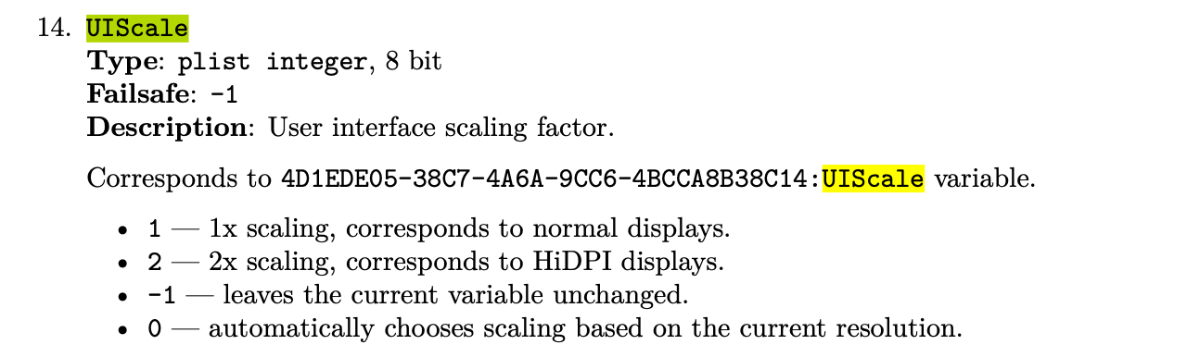
@SemanticA 2 e 0 stesso risultato (banalmente icone piu grandi di OpenCore e mela di caricamento piu' grande) su uscita DP monitor UHD (3840x2160) 1 e -1 sembra come che vada in UHD (icone la metà di prima, e stessa cosa per la mela di caricamento), credo che questa sia la piena risoluzione del monitor devo fare uno screenshot per vedere se e' in UHD anche in condizione di UISCALE settata a 2 e a 0 il mio dubbio e' cosa intendono per current resolution
-
da me a 0 o a 2 e' uguale e la cosa interessante che quando attacca la risoluzione del desktop se sono a 0 nel config non ha nemmeno un refresh o cambio di frequenza dalla parte che carica il sistema in diciamo risoluzione mela 🙂
-
cmq grazie a tutti i numeri che avete dato in poco tempo 🙂 mi avete fatto voglia di cambiare i valori in UISCALE 🙂 scusate il piccolo OT
-
purtroppo ho cambiato tutti i valori speriamo che funzioni bene anche icloud
-
fai un backup del tuo config e prova a vedere se hai il problema con questo qui config.plist.zip
-
No se vuoi posta il tuo config , il problema di prima e' un cattivo SMBIOS (o generato male oppure in parte obsoleto)
-
in che senso? se lo attivi da bios poi devi modificare il valore nel config, e nel caso non ti serva lasciarlo su -1
-
clover-config.plist.zip @oliver660_1qui e' stata attivata
-
Dai un’altra chance alla efi di clover attiva la patch topology che di base è disattivata e vedi se ti passa quel blocco iniziale
-
Controlla se hai attivo o meno il quirk xhci port limit e fai il contrario di come sta questo dalla efi che ti è partita @oliver660_1
-
io ho tolto il nullcpu cmq se ancora non parte con Opencore se vuoi @oliver660_1prova questa EFI fatta con Clover utilizza una patch vecchia per topology della cpu vediamo che accade (sempre se vuoi provare) magari prova da una penna usb EFI-2.zip