
-
Posts
6,199 -
Joined
-
Days Won
397
Content Type
Profiles
Forums
Events
Downloads
Everything posted by Anto65
-
Prova a togliere tt gli ssdt e lascia solo Ssdt-Basic lo trovi in download Resetnvram prima di avviare
-

Problemi nella configurazione dopo l’installazione
Anto65 replied to Vito00's topic in General Discussion
??? -
Problemi nella configurazione dopo l’installazione
Anto65 replied to Vito00's topic in General Discussion
Copia la cartella Boot e OC ( della usb ) nella EFI del disco La cartella Microsoft copiala sul desktop eliminala dal disco ... Riavvia Ricopia la cartella Microsoft ( nn rinominare niente ) in EFI -
Grazie , auguroni anche a voi e famiglia !
-
Avevi questa patch abilitata " Replace one byte sequence with another ... " probabile causa dell errore ACPI Forse volevi abilitare " Change _OSI to XOSI " invece ? ( fatto ) Prova EFI.zip
-
SecureBootModel ? Provato con Disabled ??
-
Sara' una pezza 😆 .... Intervento di sicurezza
-

-
macOS Big Sur 11.7.3 (20G1102)
-
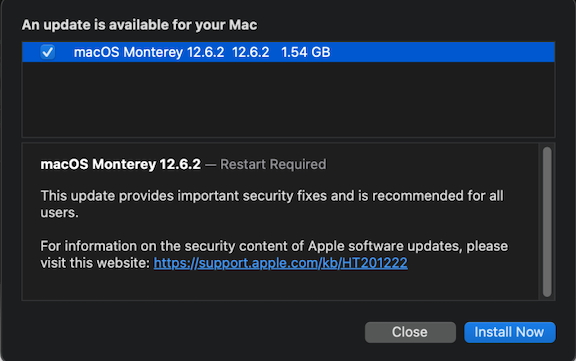
😆 aleeee' macOS Monterey 12.6.3 (21G403)
-
macOS Big Sur 11.7.2 20G1020 Full Installer ( Stessa Build della RC ) https://swcdn.apple.com/content/downloads/36/35/032-12833-A_767J3FVTQ1/27g8em98uo6ghra4newzc7lkhd4ek0u0xm/InstallAssistant.pkg
-
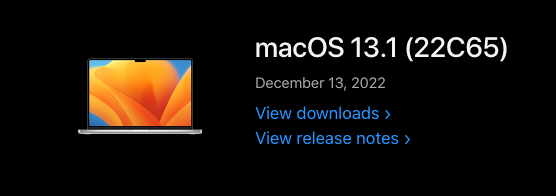
macOS Ventura 13.1 22C65 Full Installer https://swcdn.apple.com/content/downloads/30/37/012-60271-A_QUUGE8KIJ8/yp0xtj55orcpxszdtd13xjhujppspsztj3/InstallAssistant.pkg
-
Stessa versione della RC versione 12.6.2 (21G320) macOS Monterey 12.6.2 21G320 Full Installer https://swcdn.apple.com/content/downloads/55/35/032-12843-A_35UCTHBNLI/z1twfbx3mhypq6g7ljtz52z6nsv0n7e4o5/InstallAssistant.pkg
-
https://www.insanelymac.com/forum/topic/355046-release-macos-131-is-out/#comment-2798758 😂
-
anche qui guarda la data 13/dicembre https://developer.apple.com/news/releases/?id=12092021b
-
N0 no release
-
lo vista anchio da Mrey si e' quella .... stessa build della RC 🙃
-
Puoi provare con BOOTICE a inserire la entry nel bios e piazzarla per prima nel video punta al BOOTX64.efi di OC , puoi indirizzarlo invece nel tuo caso su CLOVERX64.efi o BOOTX64.efi https://drive.google.com/file/d/1C71mnexptzyZ9QbfytTmU3j43Isbd8g1/view?usp=share_link Se non va dal terminale di Windows come admin : bcdedit /set {bootmgr} path \EFI\CLOVER\CLOVERX64.efi
-
-
-
macOS Big Sur 11 RC 11.7.2 ( 20G1020 )
-
Release v0.8.7 Removed unwanted clear screen when launching non-text boot entry Fixed TSC/FSB for AMD CPUs in ProvideCurrentCpuInfo, thx @Shaneee Added Misc -> Boot -> HibernateSkipsPicker not to show picker if waking from macOS hibernation Changed macrecovery to download files into com.apple.recovery.boot by default, thx @dreamwhite Supported Apple builtin picker (using BootKicker.efi or PickerMode Apple) when running GPUs without Mac-EFI support on units such as the MacPro5,1 (thx @cdf, @tsialex) Enabled PickerMode Apple to successfully launch selected entry Enabled BootKicker.efi to successfully launch selected entry (via reboot) (thx @cdf) Added spoof proof UEFI 2.x checking to OpenVariableRuntimeDxe, thx @dakanji
-
Se aggiungi una dedicata si... Come già detto l integrata funziona fino alle 10 gen Comet - Lake cpu 490 motherboard
-
Ventura Beta 13.1 ( 22C5059b ) Full Installer http://swcdn.apple.com/content/downloads/00/20/032-08121-A_OQ30UOVX40/8lmy06a5z69bxssn1zb3a511omoolsrkx0/InstallAssistant.pkg
-
Monterey Beta 12.6.2 ( 21G317 ) Full Installer https://swcdn.apple.com/content/downloads/63/53/032-12142-A_1FF49TFCGC/2kccdq022smxfd2n6hu4akeakueiq086fs/InstallAssistant.pkg