Leaderboard




Popular Content
Showing content with the highest reputation on 11/08/2020 in all areas
-
AMD Power Gadget on TRX40 (CPU PM management)2 points
-

Version 1.5.1
1,319 downloads
Tools che crea la struttura della EFI per OpenCore compreso kext e driver. Permette varie tipologie Creazione EFI con OpenCore, kext e driver Release Creazione EFI con OpenCore Beta (viene compilato), kext e driver Release Creazione EFI con OpenCore, kext e driver Beta (viene tutto compilato) Possibilità di compilare OpenCore sia come Release sia come Debug1 point -
Cavolo @iCanarole sa tutte, oltre i Kext aggiornati, ora parte tutto sia con Clover che con OC anche big Purga si è inchinato 👍 Grazie adesso mi studio che cavolo sbagliavo ringrazio tutti i ragazzi per quello che fate per noi poveri apprendisti Grazie di Cuore1 point
-
si è corretto, è integrato in Clover, ti serve solo openruntime (tra l'altro è l'unico gestore memoria che hanno lasciato), driver apfs e hfs e bona1 point
-
@Gengik84grazie mille ora funziona tutto a meraviglia1 point
-
forse conviene che leggi la sezione notebook di catalina chi ha cosa e come funziona https://www.macos86.it/forum/99-notebook/1 point
-
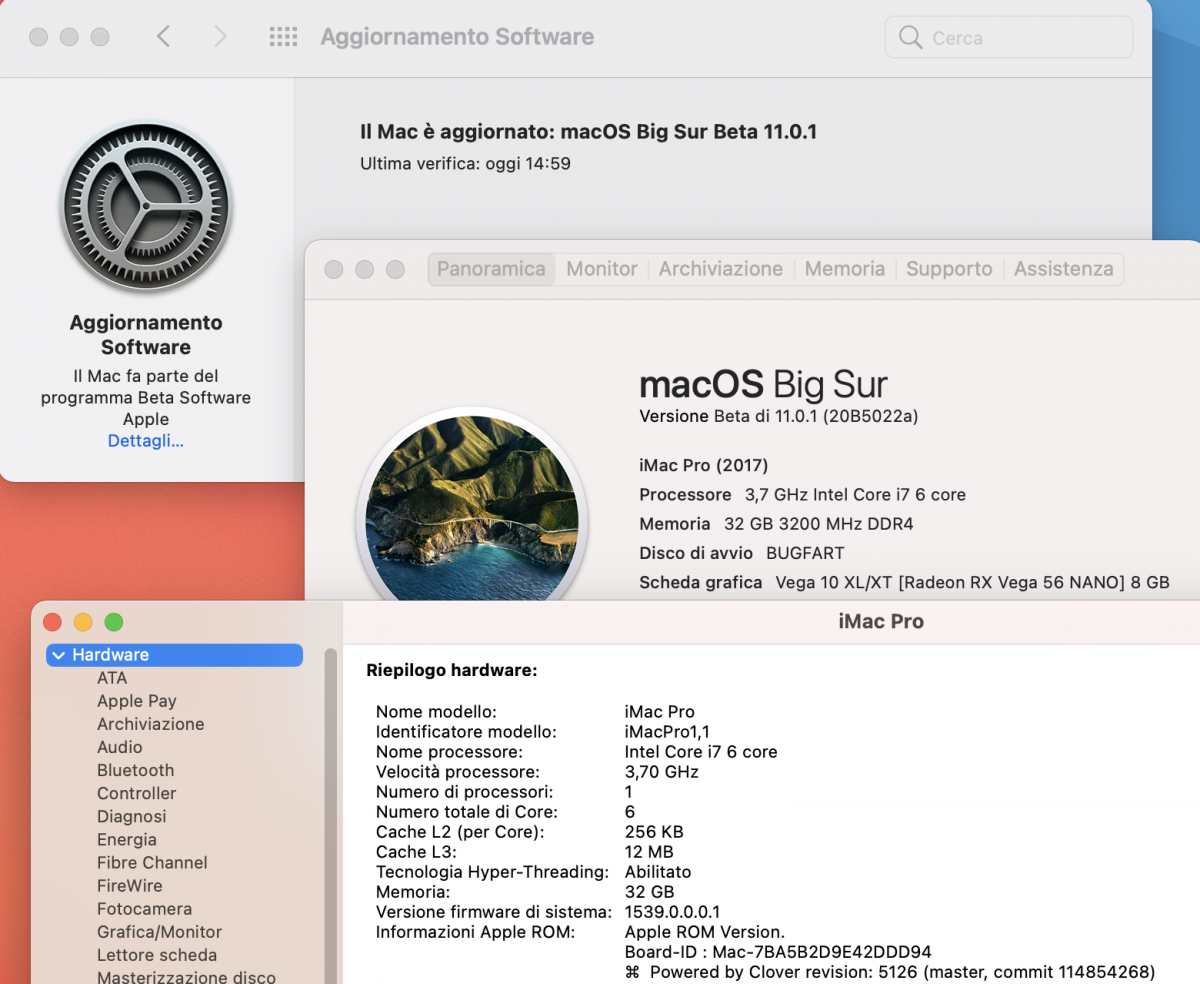
su hack Z370 ho avviato aggiornamento a BS 20B5022a con Clover 5126--114854268.efi come boot loader e sono andato a pranzo; al ritorno 😁 per chi usa VirtualSMC consiglio come boot-arg watchdog=0 onde evitare reboot casuali
1 point
-
prova a mettere ReleaseUsbOwnership YES1 point
-
Risolto grazie ad opencore.... Grazie a tutti ragazzi. Mi sa che è ora di abbandonare clover1 point
-
Fai foto anche con opencore che misà scegli icona sbagliata anche li1 point
-
Se vuoi un Sistema nuovo da Ripristinare, la 10.15.7 19H2, puoi metterla su un altro disco e ripetere l'aggiornamento...1 point
-
se non hai un open core funzionante da te @Fasullo la vedo dura configurare il nuovo clover, in quanto ha qualche problemino di suo ( e vai a capire se il problema sei tu o, probabilmente lui) 😀 prova a spostare i tuoi kext in other e partire sempre dalla icona preboot e non dati ma la vedo dura 🙂1 point
-
Big Sur 11.0.1 Beta 2 installazione riuscita sempre con OC la vecchia e prima vers. tranne i Kext aggiornati all'ultima versioneper il resto tutto come prima @iCanaro che ringrazio è andata al primo colpo alla prossima
1 point
-
non e' quella l'icona giusta prova a premere F3 vedi se ti compare una icona simile ma con scritto Preboot e' un problema di clover nuovo 😉1 point
-
Ciao, buon proposito..ma il forum nasce per aiutare le persone in difficoltà, per scaricare si richiede un minimo di messaggi..ma non per cattiveria..per conoscerci 😉 Benvenuto1 point
-
ottimo grazie Fabio....magari gli dirò di acquistarla per ultima1 point
-
Ciao, magari posta la foto del blocco sul verbose1 point
-
I would try to start from your Proxmox EFi also in Baremetal Adding full set of AMD patches and nulling all ssdt you are using in proxmox Then Devirtualize MMIO on this should be the starting point for all people who have a working Proxmox EFI You (AMD GPU user) should have less problem than I have had because AMD driver is in OSX Evaluate also well, how in your system act some quirk (booter quirk) relative to memory remapping... For me this was the key MMIO whitelisting is useful for debugging restart and shutdown problem you can have This, without using any ssdt only enabling blacklisted MMIO MSI users should not need of npci 0x2000 boot arg, also with 4g disabled in Bios I have the same bios setting I use to boot in Proxmox Now I will test more extensively the apps I usually use, but as first impressions they acts in the same way1 point
-
Seems old problem with prelinled kernel and big sur1 point
-
@meina222may I have your fully working EFI in proxmox and your mmio plist (bare metal I mean)? if you want loose some time again with bare metal I will prepare an EFI for your system I would also suggest an important thing to consider Proxmox threats ddr4 in its way so maybe a more conservative memory settings in bare metal could help if system acts weird1 point
-
Ah..as other infos I would like to share in a very happy way.... Sleep is working 🙂 🙂 🙂 🙂1 point
-
I still don't know how ... more or less ... but I managed to activate the driver again .... hurray.. the hard head always rewards if it also joins a good blow of .... ass (colorful way to say that I was lucky)
1 point
-
I would like to suggest during testing MMIO stuff to leave verbose boot on to see verbose data during reboot (often during reboot there is a fast KP, you can solve with proper quirks and MMIO skipped)1 point
-
@Pavo SSDT is loaded and variable stay there also after a reboot same behaviour of emulated NVRAM For now not useful for my problem (Nvidia web driver not loaded properly) @iGPUwaiting for your idea to try... I wonder way during my test..without doing nothing of special I have it loading well then after a problem with default secure boot parameter I have had to clear my cmos and from there no joy fabio’s iMac Pro Pavo SSDT.zip attached my IOREG with Pavo's SSDT1 point
-
thanks I will try1 point
-
No I am using emulated one..but it does not solve my Nvidia driver problem1 point
-
@meina222 our MMIO are pretty similar they diverge in the latest 4, these ones are also problematic to skip in my case1 point
-
this is what is working for me
1 point
-
opencore-2020-08-26-142151.txt.zip this is my 061 log 🙂 not tested for now, but I think it will be the same.. before I have had the same problem with both OSX now I have to re clone my VM Catalina.. before I would like to solve my real problem in OSX1 point
-
Ok..good news playing with MMIO and with opencore 061 i have solved reboot/shutdown problem... now it is working as it must work1 point
-
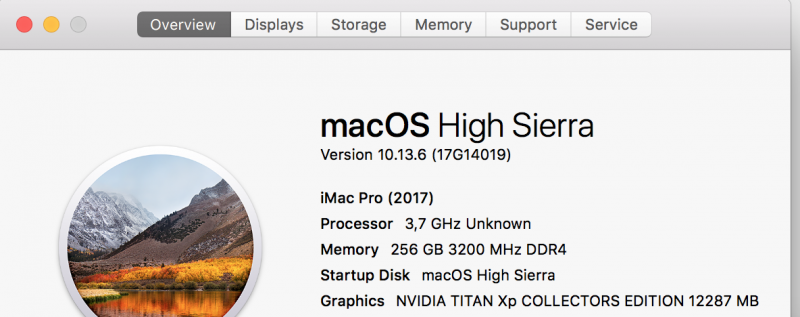
thanks for this, but also in the past it was possible to install on OSX 10.14 , 10.15 and also in big Sur Nvidia driver with different level of difficulty to do this.. my problem is in High Sierra and bare metal I have had success to install fine ( but I can't reproduce a working method) For now I have no success and I have to boot without acceleration in bare metal No others of you is using Nvidia..so I am alone..and maybe I am doing some errors I can't debug 🙂1 point
-
What I will write below is a bit OffTopic. I remind everyone, in particular those who read us but do not actively participate in the forum, that it is very important to respect some rules dictated mostly by common sense: 1) give due credit to people who share their experiences for free 2) not to steal, clone users' github without their direct permission The spirit that I would like to create and that in part I think is already in place is to share with all the people with a minimum of salt in the pumpkin (pumpkin is an acronym for head in Italian :)) our experiences on this new and fascinating possibilities we have with the TRX40 I hope you understand. I also take advantage of this OffTopic to remind you that any EFI posted is used at your own risk ... just a simple advice is valid ... do all your necessary checks before using the EFIs provided (kindly and free of charge) by the most 'willing 🙂 users1 point
-
About your MMIO first two seems identical to mine tomorrow I will check better with a proper device than my mobile doryania guide will be updated i have said to the maintainer there was a problem with suggested value on Amd discord1 point
-
Now I have understood sorry I am on my mobile only archivio. Zip is mine previous zip is a quote of your message on page 131 point
-
As side note npci 0x2000 should not used if you have 4g option in my MSI I can boot without npci and also with 4g on/off i do not also use any ssdt to boot1 point
-
My efi can’t give that schema errors simply because there are not that voices you have that voices in 061 efi you previously used so do not mix stuff be sure to use a proper version weird the other things which happen if you Have done all in a correct way gigabyte seems to act in a weird mode maybe for bios culprit I can’t say more1 point
-
and these will be the values: 0xE2100000 ----> 37926993920xE3180000 ----> 3810000896 Note I can't say if these is really related to NVRAm location....but these one are the correct locations for our TRX40 board1 point
-
MSI TRX40 Pro 10G memmap: Type Start End # Pages Attributes Available 0000000000000000-000000000009FFFF 00000000000000A0 000000000000000F Available 0000000000100000-0000000000FFFFFF 0000000000000F00 000000000000000F BS_Data 0000000001000000-000000000101FFFF 0000000000000020 000000000000000F Available 0000000001020000-0000000003FFFFFF 0000000000002FE0 000000000000000F ACPI_NVS 0000000004000000-000000000400EFFF 000000000000000F 000000000000000F Available 000000000400F000-0000000009D81FFF 0000000000005D73 000000000000000F Reserved 0000000009D82000-0000000009FFFFFF 000000000000027E 000000000000000F Available 000000000A000000-000000000FFFFFFF 0000000000006000 000000000000000F BS_Code 0000000010000000-000000001000AFFF 000000000000000B 000000000000000F Available 000000001000B000-00000000AEF13FFF 000000000009EF09 000000000000000F BS_Data 00000000AEF14000-00000000AEFCEFFF 00000000000000BB 000000000000000F LoaderCode 00000000AEFCF000-00000000AF0F8FFF 000000000000012A 000000000000000F Available 00000000AF0F9000-00000000AF0FAFFF 0000000000000002 000000000000000F BS_Data 00000000AF0FB000-00000000AF118FFF 000000000000001E 000000000000000F Available 00000000AF119000-00000000AF11DFFF 0000000000000005 000000000000000F BS_Data 00000000AF11E000-00000000AF1B9FFF 000000000000009C 000000000000000F Available 00000000AF1BA000-00000000AF1BAFFF 0000000000000001 000000000000000F BS_Data 00000000AF1BB000-00000000AF1E4FFF 000000000000002A 000000000000000F Available 00000000AF1E5000-00000000AF1E6FFF 0000000000000002 000000000000000F BS_Data 00000000AF1E7000-00000000AF20EFFF 0000000000000028 000000000000000F Available 00000000AF20F000-00000000AF210FFF 0000000000000002 000000000000000F BS_Data 00000000AF211000-00000000AF219FFF 0000000000000009 000000000000000F Available 00000000AF21A000-00000000AF21AFFF 0000000000000001 000000000000000F BS_Data 00000000AF21B000-00000000AF22CFFF 0000000000000012 000000000000000F Available 00000000AF22D000-00000000AF22DFFF 0000000000000001 000000000000000F BS_Data 00000000AF22E000-00000000B1270FFF 0000000000002043 000000000000000F BS_Code 00000000B1271000-00000000B12FFFFF 000000000000008F 000000000000000F BS_Data 00000000B1300000-00000000B44EFFFF 00000000000031F0 000000000000000F LoaderData 00000000B44F0000-00000000B44FEFFF 000000000000000F 000000000000000F BS_Data 00000000B44FF000-00000000B4666FFF 0000000000000168 000000000000000F BS_Code 00000000B4667000-00000000B4673FFF 000000000000000D 000000000000000F BS_Data 00000000B4674000-00000000B468DFFF 000000000000001A 000000000000000F BS_Code 00000000B468E000-00000000B4694FFF 0000000000000007 000000000000000F BS_Data 00000000B4695000-00000000B46A2FFF 000000000000000E 000000000000000F BS_Code 00000000B46A3000-00000000B46A4FFF 0000000000000002 000000000000000F BS_Data 00000000B46A5000-00000000B46DDFFF 0000000000000039 000000000000000F BS_Code 00000000B46DE000-00000000B471DFFF 0000000000000040 000000000000000F BS_Data 00000000B471E000-00000000B480CFFF 00000000000000EF 000000000000000F BS_Code 00000000B480D000-00000000B48DCFFF 00000000000000D0 000000000000000F BS_Data 00000000B48DD000-00000000B496FFFF 0000000000000093 000000000000000F BS_Code 00000000B4970000-00000000B4972FFF 0000000000000003 000000000000000F BS_Data 00000000B4973000-00000000B4976FFF 0000000000000004 000000000000000F BS_Code 00000000B4977000-00000000B4977FFF 0000000000000001 000000000000000F BS_Data 00000000B4978000-00000000B4979FFF 0000000000000002 000000000000000F BS_Code 00000000B497A000-00000000B497AFFF 0000000000000001 000000000000000F BS_Data 00000000B497B000-00000000B497BFFF 0000000000000001 000000000000000F BS_Code 00000000B497C000-00000000B4982FFF 0000000000000007 000000000000000F BS_Data 00000000B4983000-00000000B4996FFF 0000000000000014 000000000000000F BS_Code 00000000B4997000-00000000B4997FFF 0000000000000001 000000000000000F BS_Data 00000000B4998000-00000000B4A7CFFF 00000000000000E5 000000000000000F BS_Code 00000000B4A7D000-00000000B4A81FFF 0000000000000005 000000000000000F BS_Data 00000000B4A82000-00000000B4A8BFFF 000000000000000A 000000000000000F BS_Code 00000000B4A8C000-00000000B4A92FFF 0000000000000007 000000000000000F BS_Data 00000000B4A93000-00000000B4A99FFF 0000000000000007 000000000000000F BS_Code 00000000B4A9A000-00000000B4AA3FFF 000000000000000A 000000000000000F BS_Data 00000000B4AA4000-00000000B688EFFF 0000000000001DEB 000000000000000F BS_Code 00000000B688F000-00000000B70CEFFF 0000000000000840 000000000000000F BS_Data 00000000B70CF000-00000000B71DEFFF 0000000000000110 000000000000000F BS_Code 00000000B71DF000-00000000B726DFFF 000000000000008F 000000000000000F BS_Data 00000000B726E000-00000000B7306FFF 0000000000000099 000000000000000F BS_Code 00000000B7307000-00000000B7344FFF 000000000000003E 000000000000000F BS_Data 00000000B7345000-00000000B7382FFF 000000000000003E 000000000000000F BS_Code 00000000B7383000-00000000B741BFFF 0000000000000099 000000000000000F BS_Data 00000000B741C000-00000000B749FFFF 0000000000000084 000000000000000F BS_Code 00000000B74A0000-00000000B74A6FFF 0000000000000007 000000000000000F BS_Data 00000000B74A7000-00000000B74B4FFF 000000000000000E 000000000000000F LoaderCode 00000000B74B5000-00000000B74BDFFF 0000000000000009 000000000000000F BS_Data 00000000B74BE000-00000000B7531FFF 0000000000000074 000000000000000F BS_Code 00000000B7532000-00000000B7539FFF 0000000000000008 000000000000000F BS_Data 00000000B753A000-00000000B7543FFF 000000000000000A 000000000000000F BS_Code 00000000B7544000-00000000B7563FFF 0000000000000020 000000000000000F BS_Data 00000000B7564000-00000000B75C9FFF 0000000000000066 000000000000000F BS_Code 00000000B75CA000-00000000B75EBFFF 0000000000000022 000000000000000F BS_Data 00000000B75EC000-00000000B790EFFF 0000000000000323 000000000000000F BS_Code 00000000B790F000-00000000B7A66FFF 0000000000000158 000000000000000F BS_Data 00000000B7A67000-00000000B7BBEFFF 0000000000000158 000000000000000F BS_Code 00000000B7BBF000-00000000B7CD5FFF 0000000000000117 000000000000000F BS_Data 00000000B7CD6000-00000000B7D5DFFF 0000000000000088 000000000000000F LoaderData 00000000B7D5E000-00000000B7D5EFFF 0000000000000001 000000000000000F BS_Data 00000000B7D5F000-00000000B7D6FFFF 0000000000000011 000000000000000F BS_Code 00000000B7D70000-00000000B7D79FFF 000000000000000A 000000000000000F BS_Data 00000000B7D7A000-00000000B7D83FFF 000000000000000A 000000000000000F BS_Code 00000000B7D84000-00000000B7D86FFF 0000000000000003 000000000000000F BS_Data 00000000B7D87000-00000000B7D89FFF 0000000000000003 000000000000000F BS_Code 00000000B7D8A000-00000000B7D8EFFF 0000000000000005 000000000000000F BS_Data 00000000B7D8F000-00000000B7D93FFF 0000000000000005 000000000000000F BS_Code 00000000B7D94000-00000000B7DA0FFF 000000000000000D 000000000000000F BS_Data 00000000B7DA1000-00000000B7DA7FFF 0000000000000007 000000000000000F BS_Code 00000000B7DA8000-00000000B7DAAFFF 0000000000000003 000000000000000F BS_Data 00000000B7DAB000-00000000B7DABFFF 0000000000000001 000000000000000F BS_Code 00000000B7DAC000-00000000B7DACFFF 0000000000000001 000000000000000F BS_Data 00000000B7DAD000-00000000B7DADFFF 0000000000000001 000000000000000F BS_Code 00000000B7DAE000-00000000B7DBAFFF 000000000000000D 000000000000000F BS_Data 00000000B7DBB000-00000000B7DBBFFF 0000000000000001 000000000000000F BS_Code 00000000B7DBC000-00000000B7DCDFFF 0000000000000012 000000000000000F BS_Data 00000000B7DCE000-00000000B7DCEFFF 0000000000000001 000000000000000F BS_Code 00000000B7DCF000-00000000B7DD0FFF 0000000000000002 000000000000000F BS_Data 00000000B7DD1000-00000000B7DD1FFF 0000000000000001 000000000000000F BS_Code 00000000B7DD2000-00000000B7DD5FFF 0000000000000004 000000000000000F BS_Data 00000000B7DD6000-00000000B7DD8FFF 0000000000000003 000000000000000F BS_Code 00000000B7DD9000-00000000B7DE2FFF 000000000000000A 000000000000000F BS_Data 00000000B7DE3000-00000000B7DE3FFF 0000000000000001 000000000000000F BS_Code 00000000B7DE4000-00000000B7DE5FFF 0000000000000002 000000000000000F BS_Data 00000000B7DE6000-00000000B7DECFFF 0000000000000007 000000000000000F BS_Code 00000000B7DED000-00000000B7DFEFFF 0000000000000012 000000000000000F BS_Data 00000000B7DFF000-00000000B7E05FFF 0000000000000007 000000000000000F BS_Code 00000000B7E06000-00000000B7E1AFFF 0000000000000015 000000000000000F BS_Data 00000000B7E1B000-00000000B7E43FFF 0000000000000029 000000000000000F BS_Code 00000000B7E44000-00000000B7E4AFFF 0000000000000007 000000000000000F BS_Data 00000000B7E4B000-00000000B7E51FFF 0000000000000007 000000000000000F BS_Code 00000000B7E52000-00000000B7E56FFF 0000000000000005 000000000000000F BS_Data 00000000B7E57000-00000000B7E57FFF 0000000000000001 000000000000000F BS_Code 00000000B7E58000-00000000B7E6BFFF 0000000000000014 000000000000000F BS_Data 00000000B7E6C000-00000000B7E7DFFF 0000000000000012 000000000000000F BS_Code 00000000B7E7E000-00000000B7E8EFFF 0000000000000011 000000000000000F BS_Data 00000000B7E8F000-00000000B7E8FFFF 0000000000000001 000000000000000F BS_Code 00000000B7E90000-00000000B7E99FFF 000000000000000A 000000000000000F BS_Data 00000000B7E9A000-00000000B7E9BFFF 0000000000000002 000000000000000F BS_Code 00000000B7E9C000-00000000B7E9DFFF 0000000000000002 000000000000000F BS_Data 00000000B7E9E000-00000000B7E9FFFF 0000000000000002 000000000000000F BS_Code 00000000B7EA0000-00000000B7EA7FFF 0000000000000008 000000000000000F BS_Data 00000000B7EA8000-00000000B7EABFFF 0000000000000004 000000000000000F BS_Code 00000000B7EAC000-00000000B7EADFFF 0000000000000002 000000000000000F BS_Data 00000000B7EAE000-00000000B7EAFFFF 0000000000000002 000000000000000F BS_Code 00000000B7EB0000-00000000B7EB6FFF 0000000000000007 000000000000000F BS_Data 00000000B7EB7000-00000000B7EBDFFF 0000000000000007 000000000000000F BS_Code 00000000B7EBE000-00000000B7EC6FFF 0000000000000009 000000000000000F BS_Data 00000000B7EC7000-00000000B7EDAFFF 0000000000000014 000000000000000F BS_Code 00000000B7EDB000-00000000B7EDBFFF 0000000000000001 000000000000000F BS_Data 00000000B7EDC000-00000000B7EDCFFF 0000000000000001 000000000000000F BS_Code 00000000B7EDD000-00000000B7EDDFFF 0000000000000001 000000000000000F BS_Data 00000000B7EDE000-00000000B803CFFF 000000000000015F 000000000000000F BS_Code 00000000B803D000-00000000B8043FFF 0000000000000007 000000000000000F BS_Data 00000000B8044000-00000000B8062FFF 000000000000001F 000000000000000F BS_Code 00000000B8063000-00000000B8073FFF 0000000000000011 000000000000000F BS_Data 00000000B8074000-00000000B807BFFF 0000000000000008 000000000000000F BS_Code 00000000B807C000-00000000B807DFFF 0000000000000002 000000000000000F BS_Data 00000000B807E000-00000000B807FFFF 0000000000000002 000000000000000F BS_Code 00000000B8080000-00000000B8081FFF 0000000000000002 000000000000000F BS_Data 00000000B8082000-00000000B8095FFF 0000000000000014 000000000000000F BS_Code 00000000B8096000-00000000B8099FFF 0000000000000004 000000000000000F BS_Data 00000000B809A000-00000000B809DFFF 0000000000000004 000000000000000F BS_Code 00000000B809E000-00000000B80A1FFF 0000000000000004 000000000000000F BS_Data 00000000B80A2000-00000000B80A5FFF 0000000000000004 000000000000000F BS_Code 00000000B80A6000-00000000B80ACFFF 0000000000000007 000000000000000F BS_Data 00000000B80AD000-00000000B80BAFFF 000000000000000E 000000000000000F BS_Code 00000000B80BB000-00000000B80BBFFF 0000000000000001 000000000000000F BS_Data 00000000B80BC000-00000000B80BCFFF 0000000000000001 000000000000000F BS_Code 00000000B80BD000-00000000B80C7FFF 000000000000000B 000000000000000F BS_Data 00000000B80C8000-00000000B80D7FFF 0000000000000010 000000000000000F BS_Code 00000000B80D8000-00000000B80D9FFF 0000000000000002 000000000000000F BS_Data 00000000B80DA000-00000000B80DBFFF 0000000000000002 000000000000000F BS_Code 00000000B80DC000-00000000B80E3FFF 0000000000000008 000000000000000F BS_Data 00000000B80E4000-00000000B80E7FFF 0000000000000004 000000000000000F BS_Code 00000000B80E8000-00000000B80E9FFF 0000000000000002 000000000000000F BS_Data 00000000B80EA000-00000000B80F3FFF 000000000000000A 000000000000000F BS_Code 00000000B80F4000-00000000B80F8FFF 0000000000000005 000000000000000F BS_Data 00000000B80F9000-00000000B80FDFFF 0000000000000005 000000000000000F BS_Code 00000000B80FE000-00000000B8110FFF 0000000000000013 000000000000000F BS_Data 00000000B8111000-00000000B8118FFF 0000000000000008 000000000000000F BS_Code 00000000B8119000-00000000B8119FFF 0000000000000001 000000000000000F BS_Data 00000000B811A000-00000000B811AFFF 0000000000000001 000000000000000F BS_Code 00000000B811B000-00000000B811BFFF 0000000000000001 000000000000000F BS_Data 00000000B811C000-00000000B811CFFF 0000000000000001 000000000000000F BS_Code 00000000B811D000-00000000B811FFFF 0000000000000003 000000000000000F BS_Data 00000000B8120000-00000000B813CFFF 000000000000001D 000000000000000F BS_Code 00000000B813D000-00000000B8147FFF 000000000000000B 000000000000000F BS_Data 00000000B8148000-00000000B8149FFF 0000000000000002 000000000000000F BS_Code 00000000B814A000-00000000B814AFFF 0000000000000001 000000000000000F BS_Data 00000000B814B000-00000000B8177FFF 000000000000002D 000000000000000F BS_Code 00000000B8178000-00000000B818AFFF 0000000000000013 000000000000000F BS_Data 00000000B818B000-00000000B818DFFF 0000000000000003 000000000000000F BS_Code 00000000B818E000-00000000B8192FFF 0000000000000005 000000000000000F BS_Data 00000000B8193000-00000000B8194FFF 0000000000000002 000000000000000F BS_Code 00000000B8195000-00000000B8195FFF 0000000000000001 000000000000000F BS_Data 00000000B8196000-00000000B819CFFF 0000000000000007 000000000000000F BS_Code 00000000B819D000-00000000B819DFFF 0000000000000001 000000000000000F BS_Data 00000000B819E000-00000000B81B0FFF 0000000000000013 000000000000000F BS_Code 00000000B81B1000-00000000B81B7FFF 0000000000000007 000000000000000F BS_Data 00000000B81B8000-00000000B81B8FFF 0000000000000001 000000000000000F BS_Code 00000000B81B9000-00000000B81B9FFF 0000000000000001 000000000000000F BS_Data 00000000B81BA000-00000000B8204FFF 000000000000004B 000000000000000F BS_Code 00000000B8205000-00000000B8210FFF 000000000000000C 000000000000000F BS_Data 00000000B8211000-00000000B8262FFF 0000000000000052 000000000000000F BS_Code 00000000B8263000-00000000B8270FFF 000000000000000E 000000000000000F BS_Data 00000000B8271000-00000000B8275FFF 0000000000000005 000000000000000F BS_Code 00000000B8276000-00000000B83D4FFF 000000000000015F 000000000000000F BS_Data 00000000B83D5000-00000000B83DCFFF 0000000000000008 000000000000000F BS_Code 00000000B83DD000-00000000B83DEFFF 0000000000000002 000000000000000F BS_Data 00000000B83DF000-00000000B8430FFF 0000000000000052 000000000000000F BS_Code 00000000B8431000-00000000B843BFFF 000000000000000B 000000000000000F BS_Data 00000000B843C000-00000000B8446FFF 000000000000000B 000000000000000F BS_Code 00000000B8447000-00000000B8452FFF 000000000000000C 000000000000000F BS_Data 00000000B8453000-00000000B846AFFF 0000000000000018 000000000000000F BS_Code 00000000B846B000-00000000B8476FFF 000000000000000C 000000000000000F BS_Data 00000000B8477000-00000000B848EFFF 0000000000000018 000000000000000F BS_Code 00000000B848F000-00000000B84A2FFF 0000000000000014 000000000000000F BS_Data 00000000B84A3000-00000000B84BBFFF 0000000000000019 000000000000000F BS_Code 00000000B84BC000-00000000B84C2FFF 0000000000000007 000000000000000F BS_Data 00000000B84C3000-00000000B84C5FFF 0000000000000003 000000000000000F BS_Code 00000000B84C6000-00000000B84C7FFF 0000000000000002 000000000000000F BS_Data 00000000B84C8000-00000000B84D0FFF 0000000000000009 000000000000000F BS_Code 00000000B84D1000-00000000B84D4FFF 0000000000000004 000000000000000F BS_Data 00000000B84D5000-00000000B84D8FFF 0000000000000004 000000000000000F BS_Code 00000000B84D9000-00000000B84E6FFF 000000000000000E 000000000000000F BS_Data 00000000B84E7000-00000000B84ECFFF 0000000000000006 000000000000000F BS_Code 00000000B84ED000-00000000B84EDFFF 0000000000000001 000000000000000F BS_Data 00000000B84EE000-00000000B84EFFFF 0000000000000002 000000000000000F BS_Code 00000000B84F0000-00000000B84F0FFF 0000000000000001 000000000000000F BS_Data 00000000B84F1000-00000000B8502FFF 0000000000000012 000000000000000F BS_Code 00000000B8503000-00000000B8506FFF 0000000000000004 000000000000000F BS_Data 00000000B8507000-00000000B8507FFF 0000000000000001 000000000000000F BS_Code 00000000B8508000-00000000B8508FFF 0000000000000001 000000000000000F BS_Data 00000000B8509000-00000000B863CFFF 0000000000000134 000000000000000F BS_Code 00000000B863D000-00000000B8654FFF 0000000000000018 000000000000000F BS_Data 00000000B8655000-00000000B8663FFF 000000000000000F 000000000000000F BS_Code 00000000B8664000-00000000B8666FFF 0000000000000003 000000000000000F BS_Data 00000000B8667000-00000000B8684FFF 000000000000001E 000000000000000F BS_Code 00000000B8685000-00000000B8686FFF 0000000000000002 000000000000000F BS_Data 00000000B8687000-00000000B8688FFF 0000000000000002 000000000000000F BS_Code 00000000B8689000-00000000B868DFFF 0000000000000005 000000000000000F BS_Data 00000000B868E000-00000000B8690FFF 0000000000000003 000000000000000F BS_Code 00000000B8691000-00000000B8691FFF 0000000000000001 000000000000000F BS_Data 00000000B8692000-00000000B8692FFF 0000000000000001 000000000000000F BS_Code 00000000B8693000-00000000B869AFFF 0000000000000008 000000000000000F BS_Data 00000000B869B000-00000000B86A1FFF 0000000000000007 000000000000000F BS_Code 00000000B86A2000-00000000B86CDFFF 000000000000002C 000000000000000F BS_Data 00000000B86CE000-00000000B86D8FFF 000000000000000B 000000000000000F BS_Code 00000000B86D9000-00000000B86DAFFF 0000000000000002 000000000000000F BS_Data 00000000B86DB000-00000000B870BFFF 0000000000000031 000000000000000F BS_Code 00000000B870C000-00000000B870CFFF 0000000000000001 000000000000000F BS_Data 00000000B870D000-00000000B8710FFF 0000000000000004 000000000000000F BS_Code 00000000B8711000-00000000B8711FFF 0000000000000001 000000000000000F BS_Data 00000000B8712000-00000000B8712FFF 0000000000000001 000000000000000F BS_Code 00000000B8713000-00000000B8715FFF 0000000000000003 000000000000000F BS_Data 00000000B8716000-00000000B8719FFF 0000000000000004 000000000000000F BS_Code 00000000B871A000-00000000B871AFFF 0000000000000001 000000000000000F BS_Data 00000000B871B000-00000000B871CFFF 0000000000000002 000000000000000F BS_Code 00000000B871D000-00000000B871DFFF 0000000000000001 000000000000000F BS_Data 00000000B871E000-00000000B871EFFF 0000000000000001 000000000000000F BS_Code 00000000B871F000-00000000B871FFFF 0000000000000001 000000000000000F BS_Data 00000000B8720000-00000000B8721FFF 0000000000000002 000000000000000F BS_Code 00000000B8722000-00000000B8725FFF 0000000000000004 000000000000000F BS_Data 00000000B8726000-00000000B872CFFF 0000000000000007 000000000000000F BS_Code 00000000B872D000-00000000B872EFFF 0000000000000002 000000000000000F BS_Data 00000000B872F000-00000000B8730FFF 0000000000000002 000000000000000F BS_Code 00000000B8731000-00000000B8738FFF 0000000000000008 000000000000000F BS_Data 00000000B8739000-00000000B873AFFF 0000000000000002 000000000000000F BS_Code 00000000B873B000-00000000B873BFFF 0000000000000001 000000000000000F BS_Data 00000000B873C000-00000000B873CFFF 0000000000000001 000000000000000F BS_Code 00000000B873D000-00000000B873DFFF 0000000000000001 000000000000000F BS_Data 00000000B873E000-00000000B8750FFF 0000000000000013 000000000000000F BS_Code 00000000B8751000-00000000B8752FFF 0000000000000002 000000000000000F BS_Data 00000000B8753000-00000000B8757FFF 0000000000000005 000000000000000F BS_Code 00000000B8758000-00000000B875FFFF 0000000000000008 000000000000000F BS_Data 00000000B8760000-00000000B876FFFF 0000000000000010 000000000000000F BS_Code 00000000B8770000-00000000B877AFFF 000000000000000B 000000000000000F BS_Data 00000000B877B000-00000000B877EFFF 0000000000000004 000000000000000F BS_Code 00000000B877F000-00000000B8780FFF 0000000000000002 000000000000000F BS_Data 00000000B8781000-00000000B878AFFF 000000000000000A 000000000000000F BS_Code 00000000B878B000-00000000B878FFFF 0000000000000005 000000000000000F BS_Data 00000000B8790000-00000000B87ADFFF 000000000000001E 000000000000000F BS_Code 00000000B87AE000-00000000B87B0FFF 0000000000000003 000000000000000F BS_Data 00000000B87B1000-00000000B87C3FFF 0000000000000013 000000000000000F BS_Code 00000000B87C4000-00000000B87DDFFF 000000000000001A 000000000000000F BS_Data 00000000B87DE000-00000000B87E0FFF 0000000000000003 000000000000000F BS_Code 00000000B87E1000-00000000B87E1FFF 0000000000000001 000000000000000F BS_Data 00000000B87E2000-00000000B87E2FFF 0000000000000001 000000000000000F BS_Code 00000000B87E3000-00000000B87E9FFF 0000000000000007 000000000000000F BS_Data 00000000B87EA000-00000000B87EBFFF 0000000000000002 000000000000000F BS_Code 00000000B87EC000-00000000B87ECFFF 0000000000000001 000000000000000F BS_Data 00000000B87ED000-00000000B880FFFF 0000000000000023 000000000000000F BS_Code 00000000B8810000-00000000B8811FFF 0000000000000002 000000000000000F BS_Data 00000000B8812000-00000000B8815FFF 0000000000000004 000000000000000F BS_Code 00000000B8816000-00000000B8818FFF 0000000000000003 000000000000000F BS_Data 00000000B8819000-00000000B881BFFF 0000000000000003 000000000000000F BS_Code 00000000B881C000-00000000B881DFFF 0000000000000002 000000000000000F BS_Data 00000000B881E000-00000000B881FFFF 0000000000000002 000000000000000F BS_Code 00000000B8820000-00000000B8821FFF 0000000000000002 000000000000000F BS_Data 00000000B8822000-00000000B8824FFF 0000000000000003 000000000000000F BS_Code 00000000B8825000-00000000B8826FFF 0000000000000002 000000000000000F BS_Data 00000000B8827000-00000000B8828FFF 0000000000000002 000000000000000F BS_Code 00000000B8829000-00000000B882AFFF 0000000000000002 000000000000000F BS_Data 00000000B882B000-00000000B8897FFF 000000000000006D 000000000000000F BS_Code 00000000B8898000-00000000B88AAFFF 0000000000000013 000000000000000F BS_Data 00000000B88AB000-00000000B88B2FFF 0000000000000008 000000000000000F BS_Code 00000000B88B3000-00000000B88B3FFF 0000000000000001 000000000000000F BS_Data 00000000B88B4000-00000000B88B5FFF 0000000000000002 000000000000000F BS_Code 00000000B88B6000-00000000B88B6FFF 0000000000000001 000000000000000F BS_Data 00000000B88B7000-00000000B88CAFFF 0000000000000014 000000000000000F BS_Code 00000000B88CB000-00000000B88CDFFF 0000000000000003 000000000000000F BS_Data 00000000B88CE000-00000000B88D1FFF 0000000000000004 000000000000000F BS_Code 00000000B88D2000-00000000B88D4FFF 0000000000000003 000000000000000F BS_Data 00000000B88D5000-00000000B88D8FFF 0000000000000004 000000000000000F BS_Code 00000000B88D9000-00000000B88DBFFF 0000000000000003 000000000000000F BS_Data 00000000B88DC000-00000000B88DCFFF 0000000000000001 000000000000000F BS_Code 00000000B88DD000-00000000B88E0FFF 0000000000000004 000000000000000F BS_Data 00000000B88E1000-00000000B88E4FFF 0000000000000004 000000000000000F BS_Code 00000000B88E5000-00000000B88E9FFF 0000000000000005 000000000000000F BS_Data 00000000B88EA000-00000000B88F3FFF 000000000000000A 000000000000000F BS_Code 00000000B88F4000-00000000B88F4FFF 0000000000000001 000000000000000F BS_Data 00000000B88F5000-00000000B88F5FFF 0000000000000001 000000000000000F BS_Code 00000000B88F6000-00000000B88FCFFF 0000000000000007 000000000000000F BS_Data 00000000B88FD000-00000000B88FEFFF 0000000000000002 000000000000000F BS_Code 00000000B88FF000-00000000B88FFFFF 0000000000000001 000000000000000F BS_Data 00000000B8900000-00000000B8900FFF 0000000000000001 000000000000000F BS_Code 00000000B8901000-00000000B8901FFF 0000000000000001 000000000000000F BS_Data 00000000B8902000-00000000B890AFFF 0000000000000009 000000000000000F BS_Code 00000000B890B000-00000000B890DFFF 0000000000000003 000000000000000F BS_Data 00000000B890E000-00000000B8910FFF 0000000000000003 000000000000000F BS_Code 00000000B8911000-00000000B8913FFF 0000000000000003 000000000000000F BS_Data 00000000B8914000-00000000B8914FFF 0000000000000001 000000000000000F BS_Code 00000000B8915000-00000000B8915FFF 0000000000000001 000000000000000F BS_Data 00000000B8916000-00000000B8919FFF 0000000000000004 000000000000000F BS_Code 00000000B891A000-00000000B893EFFF 0000000000000025 000000000000000F BS_Data 00000000B893F000-00000000B8942FFF 0000000000000004 000000000000000F BS_Code 00000000B8943000-00000000B8943FFF 0000000000000001 000000000000000F BS_Data 00000000B8944000-00000000B8944FFF 0000000000000001 000000000000000F BS_Code 00000000B8945000-00000000B8945FFF 0000000000000001 000000000000000F BS_Data 00000000B8946000-00000000B8946FFF 0000000000000001 000000000000000F BS_Code 00000000B8947000-00000000B8947FFF 0000000000000001 000000000000000F BS_Data 00000000B8948000-00000000B8948FFF 0000000000000001 000000000000000F BS_Code 00000000B8949000-00000000B8949FFF 0000000000000001 000000000000000F BS_Data 00000000B894A000-00000000B894BFFF 0000000000000002 000000000000000F BS_Code 00000000B894C000-00000000B894CFFF 0000000000000001 000000000000000F BS_Data 00000000B894D000-00000000B8D70FFF 0000000000000424 000000000000000F BS_Code 00000000B8D71000-00000000B8D7FFFF 000000000000000F 000000000000000F BS_Data 00000000B8D80000-00000000B8D80FFF 0000000000000001 000000000000000F BS_Code 00000000B8D81000-00000000B8D81FFF 0000000000000001 000000000000000F BS_Data 00000000B8D82000-00000000B8D95FFF 0000000000000014 000000000000000F BS_Code 00000000B8D96000-00000000B8D96FFF 0000000000000001 000000000000000F BS_Data 00000000B8D97000-00000000B8D98FFF 0000000000000002 000000000000000F BS_Code 00000000B8D99000-00000000B8D99FFF 0000000000000001 000000000000000F BS_Data 00000000B8D9A000-00000000B8D9DFFF 0000000000000004 000000000000000F BS_Code 00000000B8D9E000-00000000B8DA1FFF 0000000000000004 000000000000000F BS_Data 00000000B8DA2000-00000000B8DB8FFF 0000000000000017 000000000000000F BS_Code 00000000B8DB9000-00000000B8DB9FFF 0000000000000001 000000000000000F BS_Data 00000000B8DBA000-00000000B8DC4FFF 000000000000000B 000000000000000F BS_Code 00000000B8DC5000-00000000B8DC7FFF 0000000000000003 000000000000000F BS_Data 00000000B8DC8000-00000000B8DCDFFF 0000000000000006 000000000000000F BS_Code 00000000B8DCE000-00000000B8DCEFFF 0000000000000001 000000000000000F BS_Data 00000000B8DCF000-00000000BA0F1FFF 0000000000001323 000000000000000F Reserved 00000000BA0F2000-00000000BA270FFF 000000000000017F 000000000000000F ACPI_Recl 00000000BA271000-00000000BA2C5FFF 0000000000000055 000000000000000F ACPI_NVS 00000000BA2C6000-00000000BA3E5FFF 0000000000000120 000000000000000F RT_Data 00000000BA3E6000-00000000BBB5DFFF 0000000000001778 800000000000000F RT_Code 00000000BBB5E000-00000000BBBFEFFF 00000000000000A1 800000000000000F BS_Data 00000000BBBFF000-00000000BBDFFFFF 0000000000000201 000000000000000F Available 00000000BBE00000-00000000BBE46FFF 0000000000000047 000000000000000F BS_Data 00000000BBE47000-00000000BBF46FFF 0000000000000100 000000000000000F BS_Code 00000000BBF47000-00000000BBF60FFF 000000000000001A 000000000000000F BS_Data 00000000BBF61000-00000000BBF7EFFF 000000000000001E 000000000000000F BS_Code 00000000BBF7F000-00000000BBF98FFF 000000000000001A 000000000000000F BS_Data 00000000BBF99000-00000000BBFB2FFF 000000000000001A 000000000000000F BS_Code 00000000BBFB3000-00000000BBFC2FFF 0000000000000010 000000000000000F BS_Data 00000000BBFC3000-00000000BBFD6FFF 0000000000000014 000000000000000F BS_Code 00000000BBFD7000-00000000BBFDAFFF 0000000000000004 000000000000000F BS_Data 00000000BBFDB000-00000000BBFE2FFF 0000000000000008 000000000000000F BS_Code 00000000BBFE3000-00000000BBFFFFFF 000000000000001D 000000000000000F Available 0000000100000000-000000403F1FFFFF 0000000003F3F200 000000000000000F Reserved 00000000000A0000-00000000000FFFFF 0000000000000060 000000000000000F Reserved 00000000BC000000-00000000BFFFFFFF 0000000000004000 000000000000000F MMIO 00000000E2100000-00000000E2180FFF 0000000000000081 8000000000000001 MMIO 00000000E3180000-00000000E3200FFF 0000000000000081 8000000000000001 MMIO 00000000EF100000-00000000EF280FFF 0000000000000181 8000000000000001 MMIO 00000000FA180000-00000000FA200FFF 0000000000000081 8000000000000001 MMIO 00000000FA300000-00000000FA3FFFFF 0000000000000100 8000000000000001 MMIO 00000000FEA00000-00000000FEAFFFFF 0000000000000100 8000000000000001 MMIO 00000000FEC00000-00000000FEC00FFF 0000000000000001 8000000000000001 MMIO 00000000FEC10000-00000000FEC10FFF 0000000000000001 8000000000000001 MMIO 00000000FED00000-00000000FED00FFF 0000000000000001 8000000000000001 MMIO 00000000FED40000-00000000FED44FFF 0000000000000005 8000000000000001 MMIO 00000000FED80000-00000000FED8FFFF 0000000000000010 8000000000000001 MMIO 00000000FEDC2000-00000000FEDCFFFF 000000000000000E 8000000000000001 MMIO 00000000FEDD4000-00000000FEDD5FFF 0000000000000002 8000000000000001 MMIO 00000000FEE00000-00000000FEEFFFFF 0000000000000100 8000000000000001 MMIO 00000000FF000000-00000000FFFFFFFF 0000000000001000 8000000000000001 Reserved 000000403F200000-000000403FFFFFFF 0000000000000E00 000000000000000F MMIO 0000004040000000-00000040503FFFFF 0000000000010400 8000000000000001 MMIO 0000008BB0000000-0000008BC03FFFFF 0000000000010400 8000000000000001 MMIO 0000008BE0000000-0000008BF03FFFFF 0000000000010400 8000000000000001 MMIO 000000D750000000-000000D7603FFFFF 0000000000010400 8000000000000001 Reserved : 21,085 Pages (86,364,160 Bytes) LoaderCode: 307 Pages (1,257,472 Bytes) LoaderData: 16 Pages (65,536 Bytes) BS_Code : 4,897 Pages (20,058,112 Bytes) BS_Data : 41,297 Pages (169,152,512 Bytes) RT_Code : 161 Pages (659,456 Bytes) RT_Data : 6,008 Pages (24,608,768 Bytes) ACPI_Recl : 85 Pages (348,160 Bytes) ACPI_NVS : 303 Pages (1,241,088 Bytes) MMIO : 271,916 Pages (1,113,767,936 Bytes) MMIO_Port : 0 Pages (0 Bytes) PalCode : 0 Pages (0 Bytes) Available : 67,034,705 Pages (274,574,151,680 Bytes) Persistent: 0 Pages (0 Bytes) -------------- Total Memory: 262,061 MB (274,791,542,784 Bytes) to find yours: Boot Bare metal EFI: open a shell window from bootmenu (you have to activate openshell in OC config.plist then type: FSX: X=from 0 to number EFI or drive you have in my case FS3: type memmap to print on video your memmap type memmap > memmap.txt to print on a file in dortania guide there are different value, but for us should be these two the ones useful for NVRAM (not sure and for now no answer to my clarification request): MMIO 00000000E2100000-00000000E2180FFF 0000000000000081 8000000000000001 MMIO 00000000E3180000-00000000E3200FFF 0000000000000081 8000000000000001 there you can read B21 and B31..for my knowledge no one of us have those addresses so we have calculate proper value for us to white listening..and hope some information there is fine 🙂 🙂1 point
-
common problems for all are: 1)shutdown 2) reboot with this EFI system does not hang, but above points do not work well If EFI starts fine in your system you will find in EFI folder a txt file If you have had USB problems with this EFI you should have the same problems i do not use any of SSDT you are using, I have kept your ACPI folder as is I would also try without SSDT1 point
-
attached a debug version for your system Add your SMBios data it is based on 060 debug (release) version Archivio.zip let me know1 point
-
I miss your working EFI upload it so i can re upload it in debug mode thank you @meina222 it is not advisble to play with mmio without knowing what that address do i have seen on dortania guide they advice to use two address that it seems we both do not have i have asked some explanation i would like to understand which motherboard or bios has those address1 point
-
Now i am out from my pc put if you want your working efi (fully working i mean) tomorrow morning i will upload the debug efi for your system if you search on your config applesecure boot and other name you can see in schema error description you can adjust your config it is not a debug version problem1 point
-
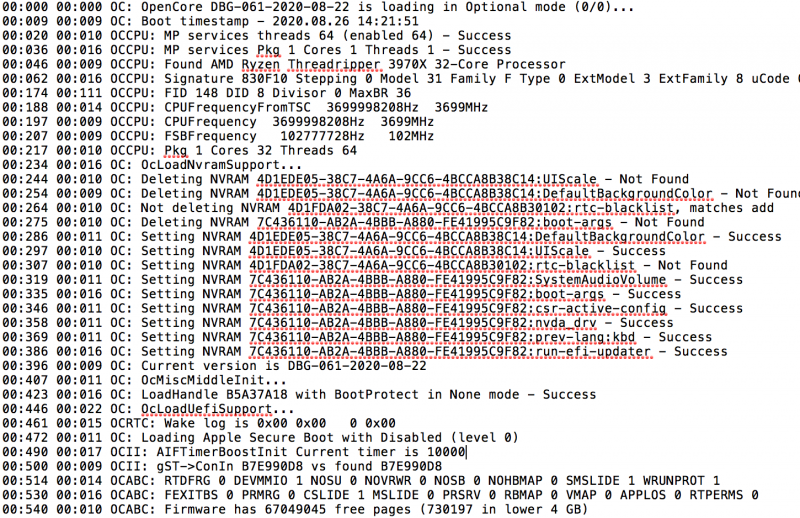
You should use the same your working non debug Efi change boot folder and opencore.efi file with the same version (only debug) you can find on acidhantera github or download with OC EFI maker app you can find in download forum section Those error are a bad config and maybe you use a 061 version with a previosus config version To enable a proper debug on a debug version of opencore you have to put target value to a value of 69 default is 3 i think1 point
-
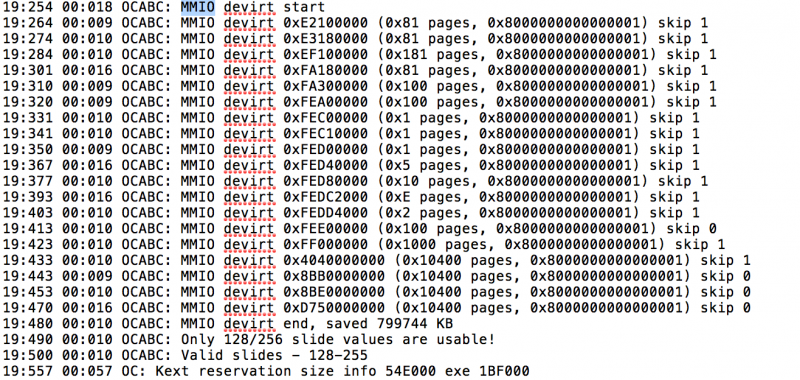
@all could you post a debug open core.txt file of your booting rig in bare metal? I would like to see this part (MMIO Address) thank you: 21:464 00:015 OCABC: MMIO devirt 0xE2100000 (0x81 pages, 0x8000000000000001) skip 0 21:474 00:009 OCABC: MMIO devirt 0xE3180000 (0x81 pages, 0x8000000000000001) skip 0 21:483 00:009 OCABC: MMIO devirt 0xEF100000 (0x181 pages, 0x8000000000000001) skip 0 21:505 00:021 OCABC: MMIO devirt 0xFA180000 (0x81 pages, 0x8000000000000001) skip 0 21:515 00:010 OCABC: MMIO devirt 0xFA300000 (0x100 pages, 0x8000000000000001) skip 0 21:531 00:015 OCABC: MMIO devirt 0xFEA00000 (0x100 pages, 0x8000000000000001) skip 0 21:540 00:009 OCABC: MMIO devirt 0xFEC00000 (0x1 pages, 0x8000000000000001) skip 0 21:550 00:009 OCABC: MMIO devirt 0xFEC10000 (0x1 pages, 0x8000000000000001) skip 0 21:560 00:010 OCABC: MMIO devirt 0xFED00000 (0x1 pages, 0x8000000000000001) skip 0 21:571 00:010 OCABC: MMIO devirt 0xFED40000 (0x5 pages, 0x8000000000000001) skip 0 21:581 00:010 OCABC: MMIO devirt 0xFED80000 (0x10 pages, 0x8000000000000001) skip 0 21:596 00:014 OCABC: MMIO devirt 0xFEDC2000 (0xE pages, 0x8000000000000001) skip 0 21:606 00:009 OCABC: MMIO devirt 0xFEDD4000 (0x2 pages, 0x8000000000000001) skip 0 21:616 00:010 OCABC: MMIO devirt 0xFEE00000 (0x100 pages, 0x8000000000000001) skip 0 21:626 00:009 OCABC: MMIO devirt 0xFF000000 (0x1000 pages, 0x8000000000000001) skip 0 21:636 00:010 OCABC: MMIO devirt 0x4040000000 (0x10400 pages, 0x8000000000000001) skip 0 21:652 00:016 OCABC: MMIO devirt 0x8BB0000000 (0x10400 pages, 0x8000000000000001) skip 0 21:663 00:010 OCABC: MMIO devirt 0x8BE0000000 (0x10400 pages, 0x8000000000000001) skip 0 21:679 00:016 OCABC: MMIO devirt 0xD750000000 (0x10400 pages, 0x8000000000000001) skip 0 21:695 00:016 OCABC: MMIO devirt end, saved 1087664 KB1 point
-
To avoid bios corruption, I would not use two quirks in booter for now first and last one this also help to have "only" a reboot on restart/shutdown selection.. I think bare metal is to try well..because, performance Is pretty the same in many task and with it we can have the chance to pass all stuff we want (PCIE card) Then it si very young this experience so some problems may occur (in my case I can't enable again my Nvidia driver in High Sierra 🙂1 point
-
@meina222maybe they are looking here to achieve parameter they put in the guide 😉 without risking being too immodest ... this one created here is the best working and public and free information group for all TRX40 users. and the credit for this great result belongs to all of us 🙂 🙂1 point
-
If you use some ssdt you have to revisit it because address changed1 point
-
On second page of this thread you will find my config pretty similar to proxmox one only booter/quirks DevirtualizeMMIO on and patches in kernel the differences You can copy your proxmox efi on an usb pen with only the above differences1 point
-
Latest available not beta works well as in proxmox1 point
-
Sometimes usb does not help to solve problem yesterday I have solved problem of continue boot in recovery with clear cmos as you said me but I can’t have again gpu acceleration in high Sierra because not all nvidia kext are loaded this is a problem because it involves SIP and also nvram/web drivers script in proxmox, same disk, kexts are loaded fine1 point