
fabiosun
-
Posts
11,958 -
Joined
-
Days Won
583
Content Type
Profiles
Forums
Events
Downloads
Everything posted by fabiosun
-
Se si va sui bordi finestra lo fa, mi sembra che il reset risolva inizialmente sugli over di icone o link grafici

-
Qualche piccolo problema grafico sul puntatore, speriamo momentaneo
-
@carlos78se non ha id particolari la vede senza fare nulla se fa schermo nero o riavvii strani prima del login disabilita WEG (whatevergreen.kext)
-
Installazione pulita no assolutamente non conosco il modello ma malissimo ch vada devi mettere WEG e pikera come bootarg se non li hai già in uso scheda supportata da tutti gli osx
-
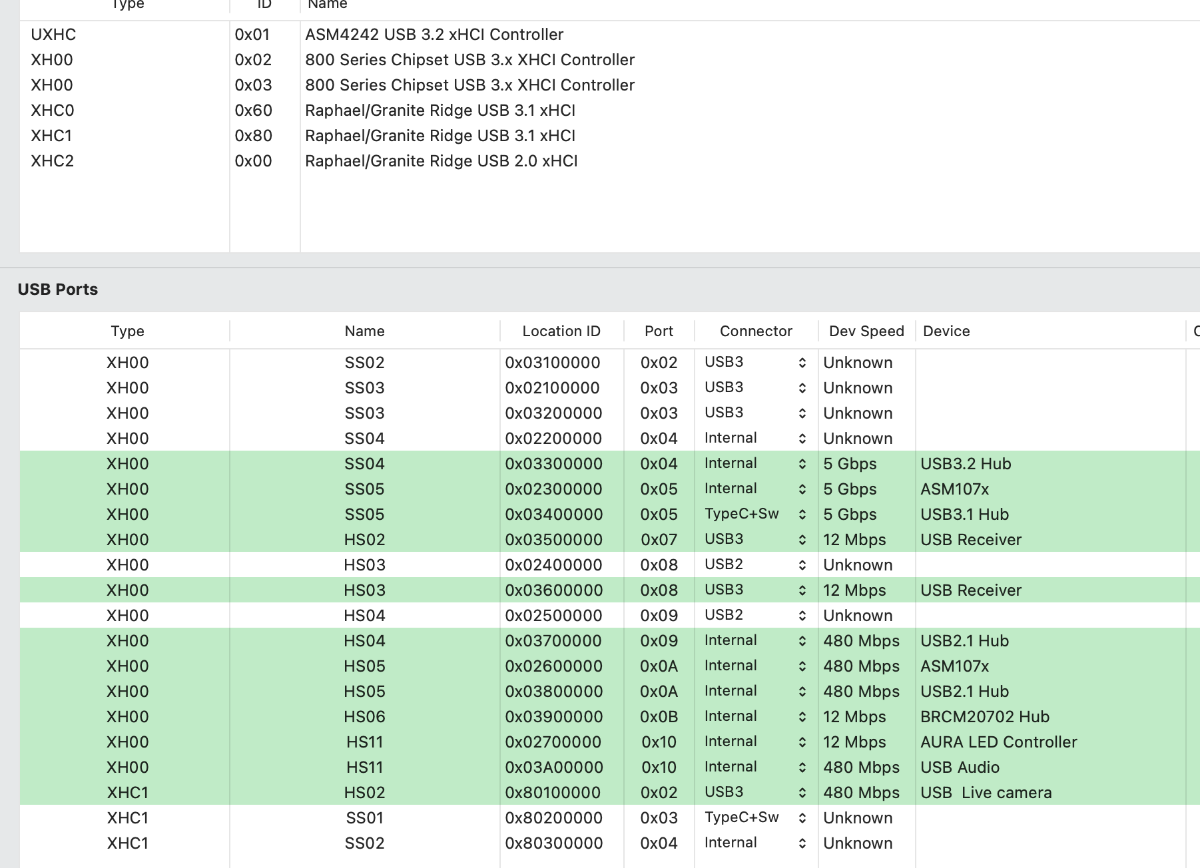
Come vedi te le segna tutte USB3 e non e' sicuramente corretto Devi fare meglio la procedura di inserimento di penne usb 2 e 3 in ogni porta e poi modificare a mano in base a quello che hai visto quando le inserisci e togli (con il tool di mappatura di CorpNewt o simili)
-
quando te la rileva come compare con Hackintool sezione USB dopo aver pulito con la scopa e fatto refresh? @audioman
-
la pcie la connetti alla usb interna della piastra madre ? Io mi ci trovo molto bene e il programmatore e' in gamba Che tipo di problemi hai ora come sei mappato? errore a parte probabile di alcune porte?
-
@audiomanil Bluetooth e' integrato alla piastra madre? se si e' sbagliato come lo hai mappato questa e' come compare da metta la mappatura dopo aver eseguito la stessa con il tool di Corpnewt non so se e' tutto corretto , ma sembra non dare problemi e tutte le porte dei controllers compatibili funzionano
-
Si ti avevo capito 🙂 nella mia piastra alcuni connettori sulla piastra (backplate ) sono visti come Hub Lo stesso per alcune porte interne sia USB2 che 3 che porto fuori sul case o all'esterno con delle bacchette USB2
-
 Se riattivando il quirk le vedi ancora, basterebbe disattivarne due che non usi pero' alla fine ogni sistema ha le sue peculiarità, e vanno raggiunte e sistemate a seconda delle proprie necessità 🙂
 -
Ti posso parlare per mia esperienza (non sono esperto di usb map e seguo quello che si trova in rete) In un mio precedente PC (Trx40) non avevo il bluetooth ed il wifi, non necessitavo di mappare e tutte le porte andavano perfettamente (anche l'audio di tipo USB) In questa piattaforma attuale se non mappo, non vedo ne l'audio (che e' di tipo USB) ne il BT Sia con questa piattaforma che nella vecchia mi va (andava) tutto compreso sleep/wake Mappare (bene) non fa comunque male al sistema e ti avvicini a come apple pensa le sue macchine (con tutti i distinguo del caso)
-
Se e' un Hub si puo' essere normale
-
Il fork che si avvicina di piu' ad un concetto di "sicurezza" d'uso dato dagli sviluppatori iniziali e' il fork di Laobmac, poi quello di Lazhoang Gli altri sono tutti di aspiranti "stregoni" 🙂 Attivare il port limit come quirk se si usa una delle ultime versioni di opencore, per alcuni aiuta a far vedere tutte le porte disponibilied eventualmente fare una mappatura ad hoc anche da OSX La versione di OCLP di Laobmac (giovane cinese), consente di attivare o meno in modo selettivo la patch al wifi o all'audio od ad entrambi Consente inoltre l'utilizzo del kext amfipass con solo un bootarg (-amfipassbeta), cestinando il piu' invasivo amfi=0x80 La versione di Laobmac, attraverso un ulteriore blocco da aggiungere in Kernel/block, consente l'utilizzo proficuo di alcune ethernet realtek 2.5 Gbit che in tahoe avevano smesso di funzionare con i "soliti" kexts di rete Se si riesce a vincere il fatto che la app e' pressoche' scritta in cinese con poche spiegazioni in inglese, quella di Laobmac e' la versione piu' efficace! 🙂
-
hai provato a togliere il -v? molte 6600 danno problemi con lo stesso altra prova e' non usare whatevergreen Poi stai usando amfi=0x80 in tahoe?
-
Devo cercare ora ONT e poi ho capito 🙂 Scherzi a parte non lo so, l'Aquantia e' una scheda che di serie funziona sui mac veri e su hack aveva delle difficoltà, hanno creato un quirk e delle patches che puoi vedere in quel link, io usavo il set di patches da 2 sole patches ed andava bene, ma usata sempre con il router /modem
-
@Giaccaznon so nemmeno che significa 🙂 https://github.com/CaseySJ/Aquantia-macOS-Patches
-
Io ho provato diverse Aquantia e funzionano tramite quirk ed un paio di patches da aggiungere nella sezione Kernel Patches (senza kext aggiuntivi)
-
sto aggiornando da un altro disco dove non ho oclp 3.5 Gb..strano piu' grande che da te 🙂
-
ok ora lo vedo ma non ho fatto revert 🙂 17,41gb ho tolto quei fix..vediamo se li rimette poi 🙂
-
qui niente ancora nemme sull'iphone...sarà che ho messo quei fix di sicurezza... 🙂 dopo aver rimosso l'aggiornamento b
-
io non la vedo ma mi fido 🙂
-
Io ho venduto un kit (che pensavo di aver pagato uno sproposito) ma con i prezzi attuali sul nuovo costava 4 volte di piu' Non servendomi piu' dopo millenni ho guadagnato vendendo un pezzo di hardware 🙂
-
Hi and welcome here @maccaroni have you searched in this thread? different users with Similar your board (and someone with your Extreme) Thread is not more updated because new CPU have more success by now in hackintosh By the way, here Olarila is not supported for different reason! One reason (personal reason) is inside your Olarila/kext EFI you have a bunch of ethernet kext there not useful in your rig and many other unproper stuff 😛 🙂
-
ah io non l'ho fatto 🙂 pare che va ancora