Leaderboard




Popular Content
Showing content with the highest reputation on 02/09/2021 in Posts
-
@Vladimiro tutto questo cosa c'entra con hackintosh? Senza offesa ma basterebbe fare proprie ricerche... google è tuo amico.... Non siamo qui per fornire supporto dalla A alla Z riguardo a windows o altri sistemi operativi. Sul web ci sono innumerevoli guide, su come fare, installare driver etc.. Topic Chiuso perchè è andato completamente fuori "tema".2 points
-
@iCanaro Santo subito. Eseguendo il reset della vram, e riscaricando l'aggiornamento (come da lui consigliato qualche post indietro) tutto è filato liscio! Soliti 3 riavvi e confermati 155 richiami di nvram!!! Grazie mille come al solito.
 1 point
 -
Porta pazienza @morfy se proprio devi riavvia e resetta la nvram dalla Guii di Open Core al prossimo riavvio va da favola almeno a me ha fatto cosi e poi è andato dritto come un treno fino alla fine tutto da solo problemi zero ed è scattante più di prima, spero ti aiuti a risolvere Saluti Perdu1 point
-
Nuova 11.2.1 build 20D741 point
-
hai Clover ultime release, i quirks, configurati, openruntime come gestore memoria e ssdt ad hoc o ssdt-basic???1 point
-
dipende da te che hai poca pazienza, quegli nvram sequence sono circa 155 quelli che devono essere eseguiti @morfy mi autocito, ma tu non sei ne tarza e ne jane1 point
-
https://www.macos86.it/topic/4318-i5-9400f-32gb-ram-corsair-gtx1060-msi-b360-high-sierra-bigsur/?do=findComment&comment=103551 ho 4 hdd connessi al pc: uno con mac, uno con windows, uno per i dati e i download e uno per i giochi che uso su windows, se io da mac non volessi vederne nessuno di quelli che uso su windows si puo' fare? se si come? grazie! devi prendere UUID di ogni disco lo trovi digitando diskutil info "nome del disco" te lo annoti e poi sempre da terminale sudo touch /etc/fstab sudo nano /etc/fstab scrivi UUID=x..x.xx none ntfs rw,noauto x devi sostituirlo con l'uuid trovato in precedenza poi salvi e riavvii1 point
-
non ci pensare nemmeno tra le altre, ho applicato questo nell'ultimo config di OC bene ora che hai tutte le porte USB aperte, allaccia le cinture di sicurezza e: poi armati di pendrive USB 2 e 3 si avvia ioreg e una alla volta si infila ed espellono entrambe le pendrive in tutte le porte presenti, si prosegue con ioreg -> file -> save as si salva, si comprime e si posta nel proprio thread o in quello dedicato assieme alle ACPI estratte ed eventualmente la EFI senza all'interno la cartella APPLE o Microsoft che appesantiscono il tutto e non servono a niente. Nota 2 - estrarre e postare le ACPI Spesso viene fatta questa richiesta, ecco come fare: CLOVER: riavviare l'hack e fermarsi nella GUI (dall'inglese Graphical User Interface) di Clover, premere il tasto F4 e aspettare 30/40 secondi (a monitor non succede assolutamente niente) poi avviare regolarmente, montare la EFI, comprimere e uplodare la cartella origin che si trova nel percorso EFI --> CLOVER --> ACPI OPENCORE: scaricare dal repository Acidanthera la versione debug della release di OC in uso https://github.com/acidanthera/OpenCorePkg/releases sostituire bootx64.efi e opencore.efi nel config Misc --> Debug abilitare/impostare su yes/true la voce SysReport riavviare e al desktop montare EFI e nella root sarà presente una nuova cartella SysReport con all'interno una cartella ACPI, comprimere e allegare sul forum quando richiesto e ripristinare versioni release dei file1 point
-
Non diamo supporto a distribuzioni di alcun tipo. Permettiamo l'uso di installer regolarmente e personalmente scaricati da server apple. Sarebbe da fare..1 point
-
@DriftwoodDo you use Davinci resolve for your job/hobby? if so can you test Candle scene benchmark if you have two radeon VII installed? I would like to see your results 🙂 and of all people who want to try1 point
-
I don't know if it is simpler or not than other motherboards, but I always wondered why other users need to block things in vfio when in my case you just have to pass them in the virtual machine configuration to be automatically passed to vfio. ... I started this journey by doing things as recommended by the proxmox wiki..to cross out all the useless things for me1 point
-
Post output of lspci -nnk 3:30 seems weird1 point
-
@Rox67erhave you a proper slot for that wifi? or you will use a pcie adapter for it?1 point
-
@Driftwoodin Catalina no rendering support for Nvidia in high Sierra performance in adobe or davinci resolve app are similar and maybe little better than a Radeon VII1 point
-
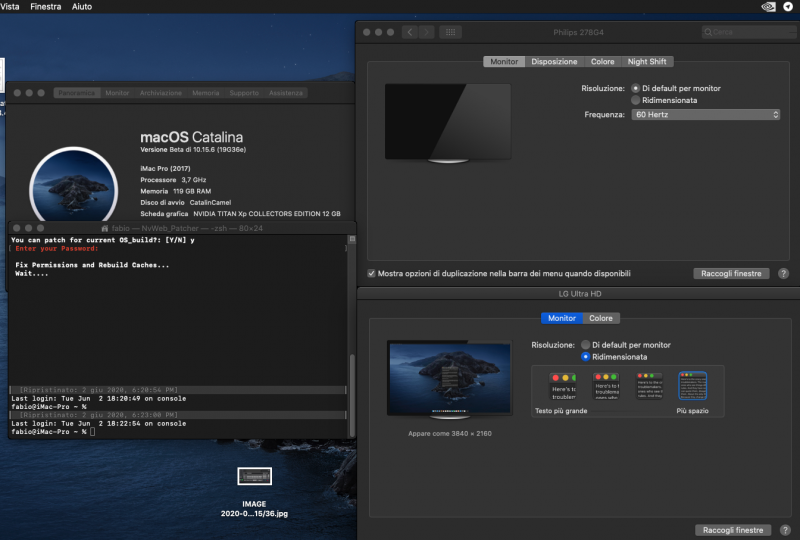
Patched Nvidia drivers allows a minimal functionality in my dual monitor system @ correct UHD resolution 🙂
1 point
-
updating to beta 2 🙂 🙂 🙂
1 point
-
@cj750they gave that beta bios in a private form to @DriftwoodI think he asked for new AGESA Usually they do not give any changement txt in this way1 point
-
@Driftwoodyour firewire video is not more reachable..may I delete the message or you can put a valid link again on? Thank you1 point
-
I do not think it will change your Proxmox World, but maybe it could help to solve 99 code error?1 point
-
Dear Customer, Thanks for your mail and feedback. Have a nice day. ASRock TSD ________________________________________ 寄件者: Fabio**************** 寄件日期: 2014年1月21日 下午 02:11 收件者: Asrock TSD 主旨: Re: Re Cold boot problem Thank you for your fast answer. Yes i would like to install osx 10.9.2 I have ha success with your 3.90 firmware having OSX working perfectly with X79 Extreme 9 and xeon v2 cpu i have only limited osx speedstep control with msr unlock should be ok today i will try with 3.90 firmware all is working except game blaster audio, it is not supported thank you again Inviato da iPhone > Il giorno 21/gen/2014, alle ore 05:10, Asrock TSD <Asrock_TSD@asrock.com.tw> ha scritto: > > Dear Customer, > > Thanks for contacting ASRock. > > Please update BIOS L3.91 from attached file for try, it unlock the specific bit of MSR. > Can you tell us what's the application of that, install Mac OS? > > Thanks for your mail. > > Cheers, > ASRock TSD OT 🙂1 point
-
Deb files are not relevant for nvme I think1 point
-
put in your signature your hardware then explain where proxmox is installed and put also your VM config, grub.cfg and others configuration file you have modified You can (to start) use proxmox file without patching anything then, when you understand better you can try more advanced features Stay simple to understand your rig is the best advice I can give 🙂 Your GPU, as some other AMD could have a problem (reset bug9 and could also be necessary to add GPU bios to the vm.. I do not have this problem because in Proxmox my Nvidia card works fine only passing it in usual way1 point
-
@Rocket88 you do not need to have another pc to boot VM in proxmox for trx40 and also x570 user is possible to do in different way we are usual to see in traditional proxmox guide. if you see a my early video you can see i use both method. Automatic vm boot and manual boot launching from my amd rig qm start 100 you have to play with stuff you block in blacklist.conf file. i think also all of you could achieve the same we do not need many things we find in canonic way to set proxmox. you have to try by yourself to believe.😁 About 99 code error it is a not good thing and i havent ever had it in my rig maybe it is related to Amd gpu, or to internal wifi bluetooth i have not1 point
-
no, how to you upload EFI on Proxmox? EFI.ziptry attached efi if you want 😉1 point
-
@TheDaemonBarberexplain please 🙂 are you passing entire disk where are you booting?OSX and EFI I mean?1 point
-
Hi @TheDaemonBarber welcome here with clover your system starts? if so upload your clover Efi1 point
-
For MSI TRX40 Creator users..new AGESA 1.0.0.4 in new BIOS here: https://us.msi.com/Motherboard/support/Creator-TRX401 point
-
it seems this is the same..and no other chip on there and also no big molex: https://www.amazon.it/startech-PEX1394B3LP-Port-profilo-FireWire/dp/B00442T240/ https://www.amazon.com/gp/offer-listing/B00442T240/1 point
-
@Driftwooda my curiosity 🙂 which case do you have? temperatures are fine with that Noctua? TY1 point
-
a request: for people using proxmox in dual GPU rig, if possible put here your BIOS config useful to boot with Proxmox (CSM/UEFI/4g and so on).. And also to summarise which problem you have had (if you had) to start with proxmox in this condition (dual GPU inserted) Thank you1 point
-
I hope many people, also silent people following here without participating, share their experiences to do a more useful and generic guide possible. i take note of all your observation and when I can verify by myself I will add o. Original post to improve my guide😉1 point
-
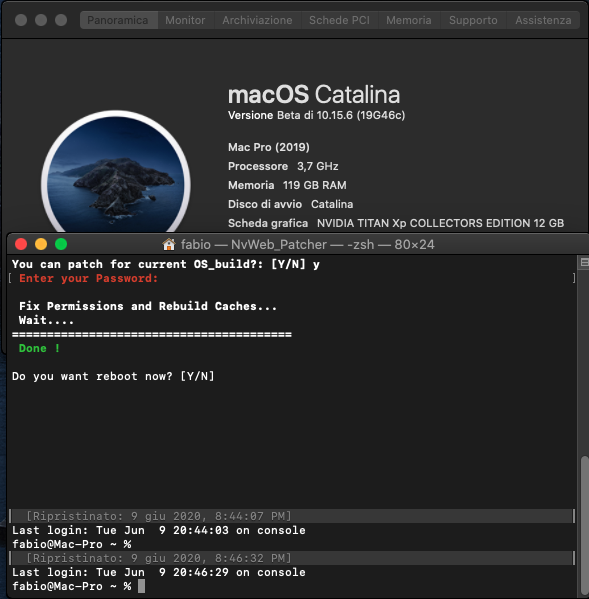
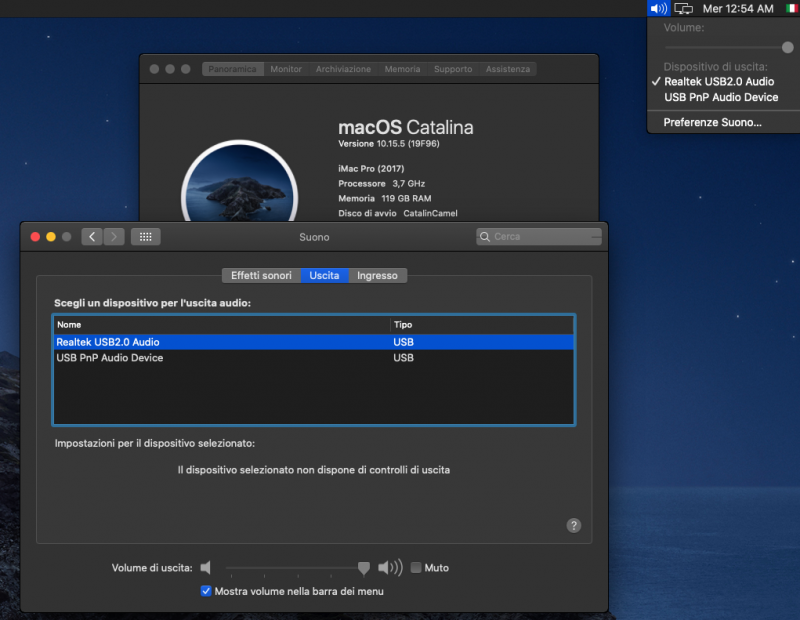
Apple hates our Realtek 2.0 audio sorry I choose wrong Realtek 2.0 audio on my sound settings it is gone again now, no audio Also in 10.15.6 first beta is working well and the only problem is jack detection as before Cheap usb audio is always working fine as in 10.15.5 release1 point
-
beta 10.15.6
1 point
-
1 point
-
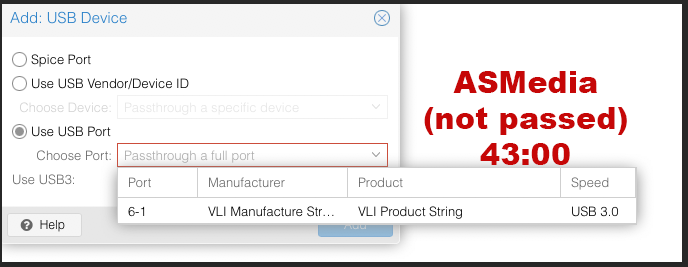
my advise is to install proxmox on a minimal SSD disk connected on USB type c (ASMedia) this escamotage will allow you to pass easily all others controllers you have like NVME, SATA, USB (USB with all caution you must have also reading entire this thread) In my particular case I have all sata disk connected and two NVME passed happily.. I think also for your creator could be the same then everyone must adopt best way for his pipeline...and for now..if you follow what I have written here and in the guide..with latest 10.15.5 you have also a perfect working internal audio.. Only with latest 10.15.5 because with previous version scratch could appear some time...but it is a driver problem with our "weird" usb audio (two chip for this task)1 point
-
ciao @Rox67erin my case ..and sorry I am not so precise in it but I remember this you can see here
1 point
-
Agree! i use ASMedia usb for proxmox with a Samsung 840 pro ssd. And this is the easy way to have the chance to pass trough all other controllers I have in my msi trx40 pro 10g1 point
-
@Driftwoodare you in 10.15.5?1 point
-
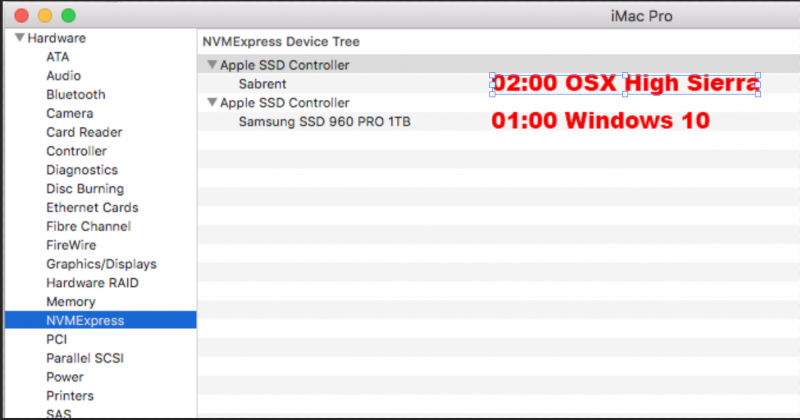
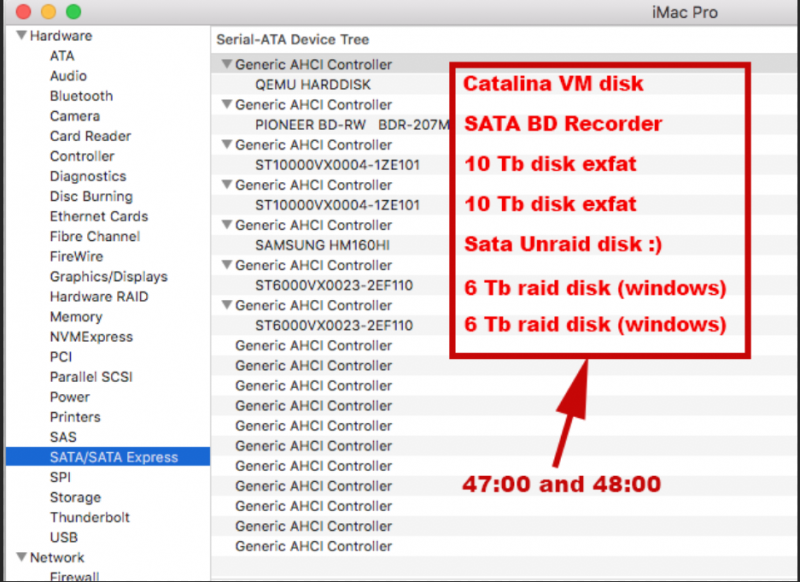
OT (about Unraid) to test I have built an Unraid test OSX VM, I did to verify if in there I have a better HighSierra support..it is not 🙂 below IOMMU groups seen in Unraid and others datas: PCI Devices and IOMMU Groups IOMMU group 0: [1022:1482] 00:01.0 Host bridge: Advanced Micro Devices, Inc. [AMD] Starship/Matisse PCIe Dummy Host Bridge IOMMU group 1: [1022:1483] 00:01.1 PCI bridge: Advanced Micro Devices, Inc. [AMD] Starship/Matisse GPP Bridge IOMMU group 2: [1022:1483] 00:01.2 PCI bridge: Advanced Micro Devices, Inc. [AMD] Starship/Matisse GPP Bridge IOMMU group 3: [1022:1482] 00:02.0 Host bridge: Advanced Micro Devices, Inc. [AMD] Starship/Matisse PCIe Dummy Host Bridge IOMMU group 4: [1022:1482] 00:03.0 Host bridge: Advanced Micro Devices, Inc. [AMD] Starship/Matisse PCIe Dummy Host Bridge IOMMU group 5: [1022:1482] 00:04.0 Host bridge: Advanced Micro Devices, Inc. [AMD] Starship/Matisse PCIe Dummy Host Bridge IOMMU group 6: [1022:1482] 00:05.0 Host bridge: Advanced Micro Devices, Inc. [AMD] Starship/Matisse PCIe Dummy Host Bridge IOMMU group 7: [1022:1482] 00:07.0 Host bridge: Advanced Micro Devices, Inc. [AMD] Starship/Matisse PCIe Dummy Host Bridge IOMMU group 8: [1022:1484] 00:07.1 PCI bridge: Advanced Micro Devices, Inc. [AMD] Starship/Matisse Internal PCIe GPP Bridge 0 to bus[E:B] IOMMU group 9: [1022:1482] 00:08.0 Host bridge: Advanced Micro Devices, Inc. [AMD] Starship/Matisse PCIe Dummy Host Bridge IOMMU group 10: [1022:1484] 00:08.1 PCI bridge: Advanced Micro Devices, Inc. [AMD] Starship/Matisse Internal PCIe GPP Bridge 0 to bus[E:B] IOMMU group 11: [1022:790b] 00:14.0 SMBus: Advanced Micro Devices, Inc. [AMD] FCH SMBus Controller (rev 61) [1022:790e] 00:14.3 ISA bridge: Advanced Micro Devices, Inc. [AMD] FCH LPC Bridge (rev 51) IOMMU group 12: [1022:1490] 00:18.0 Host bridge: Advanced Micro Devices, Inc. [AMD] Starship Device 24; Function 0 [1022:1491] 00:18.1 Host bridge: Advanced Micro Devices, Inc. [AMD] Starship Device 24; Function 1 [1022:1492] 00:18.2 Host bridge: Advanced Micro Devices, Inc. [AMD] Starship Device 24; Function 2 [1022:1493] 00:18.3 Host bridge: Advanced Micro Devices, Inc. [AMD] Starship Device 24; Function 3 [1022:1494] 00:18.4 Host bridge: Advanced Micro Devices, Inc. [AMD] Starship Device 24; Function 4 [1022:1495] 00:18.5 Host bridge: Advanced Micro Devices, Inc. [AMD] Starship Device 24; Function 5 [1022:1496] 00:18.6 Host bridge: Advanced Micro Devices, Inc. [AMD] Starship Device 24; Function 6 [1022:1497] 00:18.7 Host bridge: Advanced Micro Devices, Inc. [AMD] Starship Device 24; Function 7 IOMMU group 13: [144d:a804] 01:00.0 Non-Volatile memory controller: Samsung Electronics Co Ltd NVMe SSD Controller SM961/PM961 IOMMU group 14: [1987:5012] 02:00.0 Non-Volatile memory controller: Phison Electronics Corporation E12 NVMe Controller (rev 01) IOMMU group 15: [1022:148a] 03:00.0 Non-Essential Instrumentation [1300]: Advanced Micro Devices, Inc. [AMD] Starship/Matisse PCIe Dummy Function IOMMU group 16: [1022:1485] 04:00.0 Non-Essential Instrumentation [1300]: Advanced Micro Devices, Inc. [AMD] Starship/Matisse Reserved SPP IOMMU group 17: [1022:148c] 04:00.3 USB controller: Advanced Micro Devices, Inc. [AMD] Starship USB 3.0 Host Controller IOMMU group 18: [1022:1482] 20:01.0 Host bridge: Advanced Micro Devices, Inc. [AMD] Starship/Matisse PCIe Dummy Host Bridge IOMMU group 19: [1022:1482] 20:02.0 Host bridge: Advanced Micro Devices, Inc. [AMD] Starship/Matisse PCIe Dummy Host Bridge IOMMU group 20: [1022:1482] 20:03.0 Host bridge: Advanced Micro Devices, Inc. [AMD] Starship/Matisse PCIe Dummy Host Bridge IOMMU group 21: [1022:1483] 20:03.1 PCI bridge: Advanced Micro Devices, Inc. [AMD] Starship/Matisse GPP Bridge IOMMU group 22: [1022:1482] 20:04.0 Host bridge: Advanced Micro Devices, Inc. [AMD] Starship/Matisse PCIe Dummy Host Bridge IOMMU group 23: [1022:1482] 20:05.0 Host bridge: Advanced Micro Devices, Inc. [AMD] Starship/Matisse PCIe Dummy Host Bridge IOMMU group 24: [1022:1482] 20:07.0 Host bridge: Advanced Micro Devices, Inc. [AMD] Starship/Matisse PCIe Dummy Host Bridge IOMMU group 25: [1022:1484] 20:07.1 PCI bridge: Advanced Micro Devices, Inc. [AMD] Starship/Matisse Internal PCIe GPP Bridge 0 to bus[E:B] IOMMU group 26: [1022:1482] 20:08.0 Host bridge: Advanced Micro Devices, Inc. [AMD] Starship/Matisse PCIe Dummy Host Bridge IOMMU group 27: [1022:1484] 20:08.1 PCI bridge: Advanced Micro Devices, Inc. [AMD] Starship/Matisse Internal PCIe GPP Bridge 0 to bus[E:B] IOMMU group 28: [10de:1b02] 21:00.0 VGA compatible controller: NVIDIA Corporation GP102 [TITAN Xp] (rev a1) [10de:10ef] 21:00.1 Audio device: NVIDIA Corporation GP102 HDMI Audio Controller (rev a1) IOMMU group 29: [1022:148a] 22:00.0 Non-Essential Instrumentation [1300]: Advanced Micro Devices, Inc. [AMD] Starship/Matisse PCIe Dummy Function IOMMU group 30: [1022:1485] 23:00.0 Non-Essential Instrumentation [1300]: Advanced Micro Devices, Inc. [AMD] Starship/Matisse Reserved SPP IOMMU group 31: [1022:1486] 23:00.1 Encryption controller: Advanced Micro Devices, Inc. [AMD] Starship/Matisse Cryptographic Coprocessor PSPCPP IOMMU group 32: [1022:148c] 23:00.3 USB controller: Advanced Micro Devices, Inc. [AMD] Starship USB 3.0 Host Controller IOMMU group 33: [1022:1487] 23:00.4 Audio device: Advanced Micro Devices, Inc. [AMD] Starship/Matisse HD Audio Controller IOMMU group 34: [1022:1482] 40:01.0 Host bridge: Advanced Micro Devices, Inc. [AMD] Starship/Matisse PCIe Dummy Host Bridge IOMMU group 35: [1022:1483] 40:01.1 PCI bridge: Advanced Micro Devices, Inc. [AMD] Starship/Matisse GPP Bridge IOMMU group 36: [1022:1483] 40:01.3 PCI bridge: Advanced Micro Devices, Inc. [AMD] Starship/Matisse GPP Bridge IOMMU group 37: [1022:1482] 40:02.0 Host bridge: Advanced Micro Devices, Inc. [AMD] Starship/Matisse PCIe Dummy Host Bridge IOMMU group 38: [1022:1482] 40:03.0 Host bridge: Advanced Micro Devices, Inc. [AMD] Starship/Matisse PCIe Dummy Host Bridge IOMMU group 39: [1022:1482] 40:04.0 Host bridge: Advanced Micro Devices, Inc. [AMD] Starship/Matisse PCIe Dummy Host Bridge IOMMU group 40: [1022:1482] 40:05.0 Host bridge: Advanced Micro Devices, Inc. [AMD] Starship/Matisse PCIe Dummy Host Bridge IOMMU group 41: [1022:1482] 40:07.0 Host bridge: Advanced Micro Devices, Inc. [AMD] Starship/Matisse PCIe Dummy Host Bridge IOMMU group 42: [1022:1484] 40:07.1 PCI bridge: Advanced Micro Devices, Inc. [AMD] Starship/Matisse Internal PCIe GPP Bridge 0 to bus[E:B] IOMMU group 43: [1022:1482] 40:08.0 Host bridge: Advanced Micro Devices, Inc. [AMD] Starship/Matisse PCIe Dummy Host Bridge IOMMU group 44: [1022:1484] 40:08.1 PCI bridge: Advanced Micro Devices, Inc. [AMD] Starship/Matisse Internal PCIe GPP Bridge 0 to bus[E:B] IOMMU group 45: [1022:57ad] 41:00.0 PCI bridge: Advanced Micro Devices, Inc. [AMD] Matisse Switch Upstream IOMMU group 46: [1022:57a3] 42:02.0 PCI bridge: Advanced Micro Devices, Inc. [AMD] Matisse PCIe GPP Bridge IOMMU group 47: [1022:57a3] 42:04.0 PCI bridge: Advanced Micro Devices, Inc. [AMD] Matisse PCIe GPP Bridge IOMMU group 48: [1022:57a3] 42:05.0 PCI bridge: Advanced Micro Devices, Inc. [AMD] Matisse PCIe GPP Bridge IOMMU group 49: [1022:57a4] 42:08.0 PCI bridge: Advanced Micro Devices, Inc. [AMD] Matisse PCIe GPP Bridge [1022:1485] 46:00.0 Non-Essential Instrumentation [1300]: Advanced Micro Devices, Inc. [AMD] Starship/Matisse Reserved SPP [1022:149c] 46:00.1 USB controller: Advanced Micro Devices, Inc. [AMD] Matisse USB 3.0 Host Controller [1022:149c] 46:00.3 USB controller: Advanced Micro Devices, Inc. [AMD] Matisse USB 3.0 Host Controller IOMMU group 50: [1022:57a4] 42:09.0 PCI bridge: Advanced Micro Devices, Inc. [AMD] Matisse PCIe GPP Bridge [1022:7901] 47:00.0 SATA controller: Advanced Micro Devices, Inc. [AMD] FCH SATA Controller [AHCI mode] (rev 51) IOMMU group 51: [1022:57a4] 42:0a.0 PCI bridge: Advanced Micro Devices, Inc. [AMD] Matisse PCIe GPP Bridge [1022:7901] 48:00.0 SATA controller: Advanced Micro Devices, Inc. [AMD] FCH SATA Controller [AHCI mode] (rev 51) IOMMU group 52: [1b21:3242] 43:00.0 USB controller: ASMedia Technology Inc. Device 3242 IOMMU group 53: [8086:1539] 44:00.0 Ethernet controller: Intel Corporation I211 Gigabit Network Connection (rev 03) IOMMU group 54: [8086:1539] 45:00.0 Ethernet controller: Intel Corporation I211 Gigabit Network Connection (rev 03) IOMMU group 55: [1d6a:07b1] 49:00.0 Ethernet controller: Aquantia Corp. AQC107 NBase-T/IEEE 802.3bz Ethernet Controller [AQtion] (rev 02) IOMMU group 56: [1022:148a] 4a:00.0 Non-Essential Instrumentation [1300]: Advanced Micro Devices, Inc. [AMD] Starship/Matisse PCIe Dummy Function IOMMU group 57: [1022:1485] 4b:00.0 Non-Essential Instrumentation [1300]: Advanced Micro Devices, Inc. [AMD] Starship/Matisse Reserved SPP IOMMU group 58: [1022:1482] 60:01.0 Host bridge: Advanced Micro Devices, Inc. [AMD] Starship/Matisse PCIe Dummy Host Bridge IOMMU group 59: [1022:1482] 60:02.0 Host bridge: Advanced Micro Devices, Inc. [AMD] Starship/Matisse PCIe Dummy Host Bridge IOMMU group 60: [1022:1482] 60:03.0 Host bridge: Advanced Micro Devices, Inc. [AMD] Starship/Matisse PCIe Dummy Host Bridge IOMMU group 61: [1022:1482] 60:04.0 Host bridge: Advanced Micro Devices, Inc. [AMD] Starship/Matisse PCIe Dummy Host Bridge IOMMU group 62: [1022:1482] 60:05.0 Host bridge: Advanced Micro Devices, Inc. [AMD] Starship/Matisse PCIe Dummy Host Bridge IOMMU group 63: [1022:1482] 60:07.0 Host bridge: Advanced Micro Devices, Inc. [AMD] Starship/Matisse PCIe Dummy Host Bridge IOMMU group 64: [1022:1484] 60:07.1 PCI bridge: Advanced Micro Devices, Inc. [AMD] Starship/Matisse Internal PCIe GPP Bridge 0 to bus[E:B] IOMMU group 65: [1022:1482] 60:08.0 Host bridge: Advanced Micro Devices, Inc. [AMD] Starship/Matisse PCIe Dummy Host Bridge IOMMU group 66: [1022:1484] 60:08.1 PCI bridge: Advanced Micro Devices, Inc. [AMD] Starship/Matisse Internal PCIe GPP Bridge 0 to bus[E:B] IOMMU group 67: [1022:148a] 61:00.0 Non-Essential Instrumentation [1300]: Advanced Micro Devices, Inc. [AMD] Starship/Matisse PCIe Dummy Function IOMMU group 68: [1022:1485] 62:00.0 Non-Essential Instrumentation [1300]: Advanced Micro Devices, Inc. [AMD] Starship/Matisse Reserved SPP CPU Thread Pairings Pair 1: cpu 0 / cpu 32 Pair 2: cpu 1 / cpu 33 Pair 3: cpu 2 / cpu 34 Pair 4: cpu 3 / cpu 35 Pair 5: cpu 4 / cpu 36 Pair 6: cpu 5 / cpu 37 Pair 7: cpu 6 / cpu 38 Pair 8: cpu 7 / cpu 39 Pair 9: cpu 8 / cpu 40 Pair 10: cpu 9 / cpu 41 Pair 11: cpu 10 / cpu 42 Pair 12: cpu 11 / cpu 43 Pair 13: cpu 12 / cpu 44 Pair 14: cpu 13 / cpu 45 Pair 15: cpu 14 / cpu 46 Pair 16: cpu 15 / cpu 47 Pair 17: cpu 16 / cpu 48 Pair 18: cpu 17 / cpu 49 Pair 19: cpu 18 / cpu 50 Pair 20: cpu 19 / cpu 51 Pair 21: cpu 20 / cpu 52 Pair 22: cpu 21 / cpu 53 Pair 23: cpu 22 / cpu 54 Pair 24: cpu 23 / cpu 55 Pair 25: cpu 24 / cpu 56 Pair 26: cpu 25 / cpu 57 Pair 27: cpu 26 / cpu 58 Pair 28: cpu 27 / cpu 59 Pair 29: cpu 28 / cpu 60 Pair 30: cpu 29 / cpu 61 Pair 31: cpu 30 / cpu 62 Pair 32: cpu 31 / cpu 63 USB Devices Bus 001 Device 001: ID 1d6b:0002 Linux Foundation 2.0 root hub Bus 002 Device 001: ID 1d6b:0003 Linux Foundation 3.0 root hub Bus 003 Device 001: ID 1d6b:0002 Linux Foundation 2.0 root hub Bus 004 Device 001: ID 1d6b:0003 Linux Foundation 3.0 root hub Bus 005 Device 001: ID 1d6b:0002 Linux Foundation 2.0 root hub Bus 006 Device 001: ID 1d6b:0003 Linux Foundation 3.0 root hub Bus 006 Device 002: ID 2109:0715 VIA Labs, Inc. VLI Product String Bus 007 Device 001: ID 1d6b:0002 Linux Foundation 2.0 root hub Bus 007 Device 002: ID 046d:c050 Logitech, Inc. RX 250 Optical Mouse Bus 007 Device 003: ID 04d9:1702 Holtek Semiconductor, Inc. Keyboard LKS02 Bus 007 Device 004: ID 0c76:161f JMTek, LLC. USB PnP Audio Device Bus 007 Device 005: ID 0db0:543d Micro Star International USB Audio Bus 007 Device 006: ID 1462:7c60 Micro Star International MYSTIC LIGHT Bus 008 Device 001: ID 1d6b:0003 Linux Foundation 3.0 root hub Bus 009 Device 001: ID 1d6b:0002 Linux Foundation 2.0 root hub Bus 009 Device 002: ID 13fe:4200 Kingston Technology Company Inc. USB DISK 2.0 Bus 009 Device 003: ID 05e3:0608 Genesys Logic, Inc. Hub Bus 010 Device 001: ID 1d6b:0003 Linux Foundation 3.0 root hub SCSI Devices [0:0:0:0] disk Samsung SSD 840 PRO DXM0 /dev/sda 256GB [1:0:0:0] cd/dvd USB DISK 2.0 PMAP /dev/sr0 - [1:0:0:1] disk USB DISK 2.0 PMAP /dev/sdb 1.96GB [2:0:0:0] cd/dvd PIONEER BD-RW BDR-207M 1.35 /dev/sr1 - [3:0:0:0] disk ATA HGST HTS545050A7 ACA0 /dev/sdc 500GB [4:0:0:0] disk ATA ST6000VX0023-2EF SC60 /dev/sdd 6.00TB [5:0:0:0] disk ATA ST6000VX0023-2EF SC60 /dev/sde 6.00TB [6:0:0:0] disk ATA ST10000VX0004-1Z AV01 /dev/sdf 10.0TB [7:0:0:0] disk ATA ST10000VX0004-1Z AV01 /dev/sdg 10.0TB [N:0:2:1] disk Samsung SSD 960 PRO 1TB__1 /dev/nvme0n1 1.02TB [N:1:1:1] disk Sabrent__1 /dev/nvme1n1 1.02TB I stay in proxmox 🙂1 point
-
Also I do not use actual patch you can find in pavo GitHub but older ones. I think he is doing multi platform experiment with this patches to try to solve Problem for other platform. I think also @Pavo could confirm this as he did in private few hour ago @iGPUif you have another working Linux you can compile by yourself I prefer @Pavogive you clear instruction because he has helped me to understand how. to all audio is working and the only problem now is audio jack Detection. by the way now i think pavo had some success we audio in unraid. Maybe it could be useful also in proxmox understand well how Unraid works1 point
-
@iGPU could you post lspci -nnk output of this msi board? I would like to check because iommu seems to be weird1 point
-
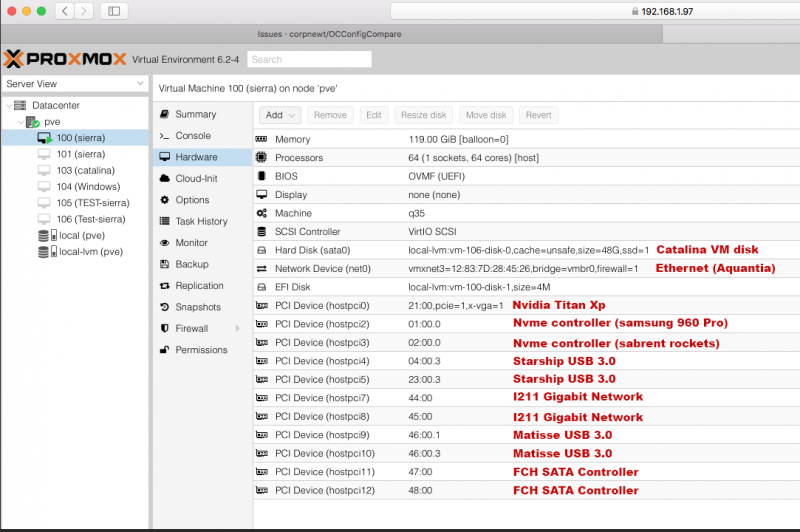
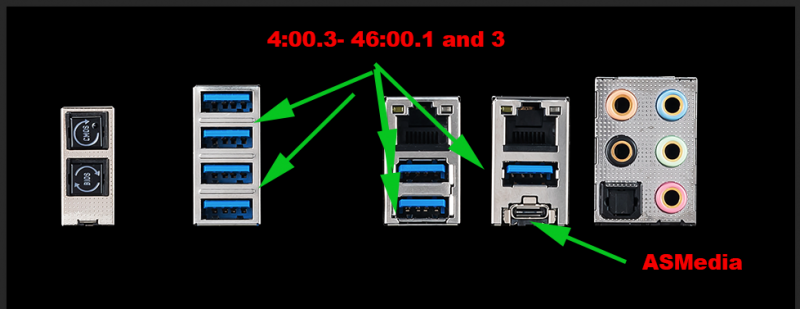
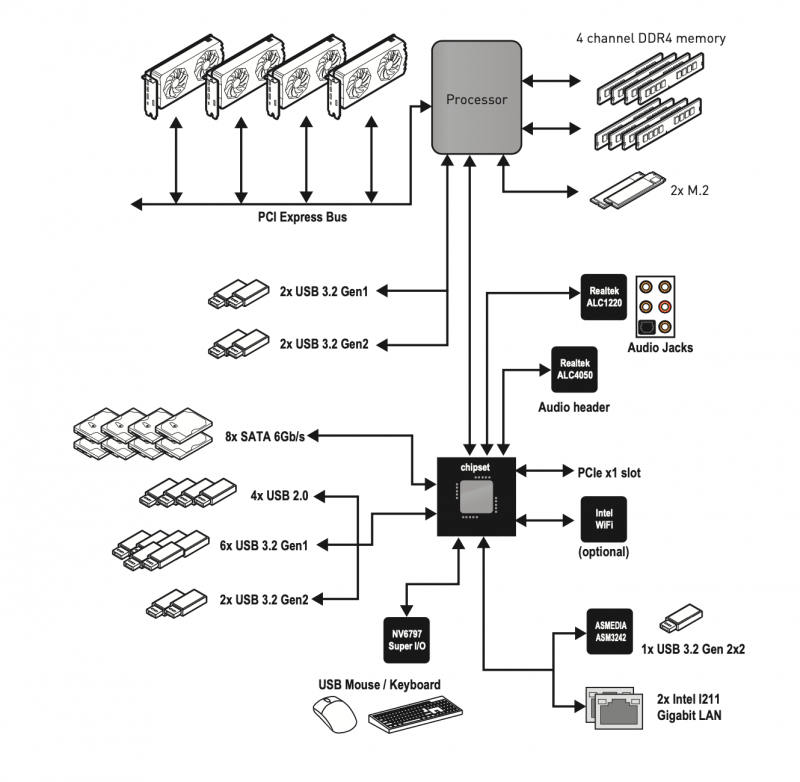
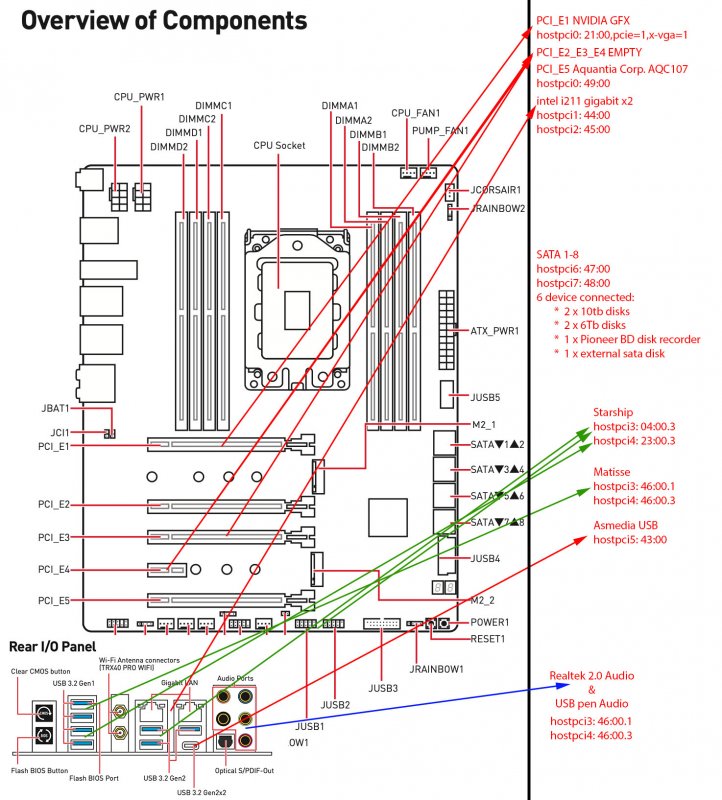
This is my last schema. I can pass more stuff but all usb in my motherboard are owned by 46:00 controller...ah also audio is in there VM OS system limit USB3 detection (High Sierra) Catalina and Windows 64 have a better USB management (their drivers allow to see USB 3 devices if connected . So to a clean installation in my MSI TRX40 Pro 10G I do not use any FLR patch (no need to passthrough 23:00.3, 4:00.3 USB Controllers or 23:00.4 audio controller it is also mandatory to pass 4:00.3 and 23:00.3 (FLR Patch 148c) (do not pass 23:00:4 audio controller) All I need is 46:00, 4:00.3 and 23:00.3 controllers which I can passthrough in two different way: Hostpci5: 46:00 or hostpci6: 46:00.1 hostpci7: 46:00.3 then hostpci7: 04:00.3 hostpci7: 23:00.3 I think also for you should be the same (you have also to find your main USB controller and your exact groups). Interesting is also to check this schematic picture, inside USB/audio/chipset connections with AMD CPU:
1 point
-
All problem we have (except gpu amd reset bug) are related to proxmox—->OS X usb driver version then stuff like WiFi or Bt could also be related to our weird problem in conjunction with passed usb controllers later I will try to explain more in detail and I would grateful if some of you could do some tries to confirm this @Jaidy to start you have to connect to cabled ethernet it seems your WiFi card is not seen by default proxmox driver you can also find a driver for it but in this way you are adding additional difficulty to your starting proxmox/Linux learning curve1 point
-
If I understand well it seems more probable it is related to amd Gpu reset bug?1 point
-
Hi first of all thank you to you and all people are keeping updating this thread with their experiences I appreciate it so much About 7-5 error when you boot proxmox, you should have to update your proxmox.I opened a thread on Proxmox support site time ago. Now with latest proxmox kernel that errors could not appears anymore Instead a bunch ACPI error could always happen For both (7-5 errors and acpi errors) a man of proxmox stuff said it is not a problem at all. I have not specifically competence to understand if It is true..so I have to accept as it is link to thread I said before1 point
-
@iGPUyou are not the one to have problem with Gigabyte/3970x... so maybe I have to stay with mine for now 🙂 for me all is perfect (except internal audio in High Sierra) I can do my job inside it as I do in windows...no more no less I hope you solve soon as you can your problem (trx40 creator for me is not a choice because I have 8 internal sata devices connected)1 point
-
I think (I repeat my self) you do not need many stuff you have in your config.. but this boot args are wrong 😛 And I am remarking it (as we were friends from long time (to be less serious or "master" because if people use that args then VM does not start When you have time correct it (please) Then, I am very happy when you (and others) post their results..but for learning some more detailed explanation is necessary... ie why for you pcie=1 and rombar stuff is mandatory and others things... do not thing also here we have not a job... 🙂 🙂 But the desire to have this Chip working and to share it (for free) to all hackintosh community for me was a pleasure and an honour 🙂 🙂 Now I am thinking to buy a Gigabyte Designare.because my main goal will be to have thunderbolt working (and let think..I do not need for my job) 🙂
1 point
-
@Driftwood your VM config files seems weird..and I think you copy and pasted bad here this quoted lines instigated me to ban you from here because I can't understand well (joking for banning) "Hope this helps anyone. Pavo has been instrumental in getting this working and he clearly knows what he is doing, so rather than spend days sorting this (i understand more what he tells me all the time) I think advice from an expert is advise-able if you haven't got the time atm - got jobs on." I know Pavo is good for you (you repeat here so often) and he is helping you in private..but this seems a bit unrespectful for me and for other users which could benefit also of "your" finding 😉 Also I can confirm that most of stuff you put in your config is unesuful...but if it is working for you I am happy By the way could be useful (and not for me) to explain what this args does for you 😛 -machine q35,kernel_irqchip=on because you do not need of it and cranking audio is another problem (if you read on Proxmox forum you can understand better) but maybe it is a my problem again no offence for me (and I hope for you) To be clear I repeat that my goal is to grow here my knowledge also with your help... if I had done this in private..maybe you, Pavo and others still would waiting at Morgonaut site with her telenovelas on fastest hack ever.. 🙂 🙂 Have a nice day1 point
-
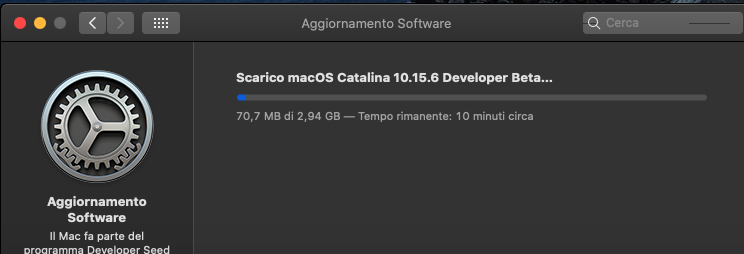
10.15.5 combo update: https://updates.cdn-apple.com/2020/macos/061-78576-20200520-5dfa5569-76e4-4b87-b11c-9e53eb7651a4/macOSUpdCombo10.15.5.dmg1 point
-
Both usb Realtek audio and cheap USB audio work well in latest OS X release... for more infos read also main fix in this release...
1 point