All Activity
- Past hour
-
Hi everyone, I am working on a High Sierra Hackintosh on an IVY Bridge desktop (15-3570k Clover) and I am currently stuck at the Unsupported CPU/AppleACPICPU stall I saw the download was available but i don't have permission. could my account please be enabled for kext downloads? Thanks in advance and thanks for running this community
- Today
-
Grazie di cuore. Buon anno anche a tutto il Forum
-
 Jeff84 joined the community
 -
a me fa delle righe a tratti....2 secondi appena dopo il boot e poi smette appena appare la schermata di avvio...credo che sia un disturbo di frequenza, (ci sarà qualche condensatore interno un pò vecchiotto è una scheda usata) l'ho presa su eBay a 50 euro un'anno fa o poco più, ma per il resto va bene è 8gb però. Ne vendono una marea su Ebay usate a 70 euro o giù di lì. Per me ripeto va bene per quello che ci devo fare. Lo so ci sono schede molto meglio tipo la RX 6950 Xt 16 Gb ma per quello che ci faccio io sarebbe sprecata (prezzo a parte)
-
@dany ma anche a te crea questo problema? intendo la rx 580 oppure questo problema non te lo crea, sempre su Tahoe intendo oppure va liscia fino alla fine sei in HDMI come uscita dalla scheda al monitor ? non voglio disturbare ci sarà qualcuno che avrà avuto lo stesso problema
-
C'è l'avevo...poi ci ho installato solo windovs e l'ho tolto, è un i5 13500 per win monta una Intel arc750, per Mac l'ho smontata e ho montato l'altra rx6600.....comunque non pensare che la rx580 vada molto peggio della rx6600....almeno per quello che ci faccio io....niente giochi solo piccoli montaggio video e un po' di musica.
-
@dany non lo vedo in firma l'i5 13500, che caratteristiche ha? io ho provato a disabilitare csm da bios migliora un pochino ma sono li non è tanto o aggiunto agdpmod=pikera nelle boot-args ma lo stesso cambia qualcosina ma non quando arrivo alla scrivania la barra degli strumenti appare lenta in confronto a tutti gli altri OS X ma prima o dopo lo troverò l'inghippo
-
weg non c'è dall'inizi0...è senza weg. P.S. la mia era una cosiderazione del fatto che la scheda video forse per tahoe da 4 gb ...dico forse è piccola, tutto qui. e niente altro.
-
Rilasciato Maxon Cinebench 2026 Homepage Download per macOS: Cinebench 2026 Technical information Cinebench 2026 tests GPU and CPU performance by using Maxon’s powerful Redshift render engine. Cinebench 2026 supports AMD and Intel x86/64 CPUs, Apple’s M1, M2, M3, M4 & M5-powered computing systems, the Snapdragon compute platform and Ampere Altra processors. Cinebench 2026 supports GPU accelerated Metal RT hardware ray tracing starting with M3-powered Macs (no changes for previously supported Apple silicon hardware). Cinebench 2026 adds support for NVIDIA 5000 series GPUs and the AMD Radeon 9000 series, as well as for NVIDIA Hopper and Blackwell data center GPUs. Cinebench 2026 adds a test to evaluate the performance of SMT enabled cpu cores. Cinebench is based on the latest Cinema 4D 2026 and Redshift code using updated compilers (Clang V19) and has a minimum runtime activated by default. Cinebench 2026 provides improved benchmark accuracy for current and next generation CPUs to test if a machine runs stable on a high CPU load, if the cooling solution of a desktop or notebook is sufficient for longer running tasks to deliver the full potential of the CPU and if a machine can handle demanding real-life 3D tasks. Users have the option to directly test the single core performance without manually enabling the “Advanced benchmark” option. The “Advanced benchmark” allows users to set arbitrary minimum runtimes to stress test the hardware for even longer periods of time. Because of the code and compiler changes that have accelerated the rendering of the scene, Cinebench 2026 score values are readjusted to a new range so they should not be compared to scores from previous versions of Cinebench. Compared to Cinebench R23 the computational effort for the scene increased sixfold in the multithreaded rendering test. This reflects the CPU performance improvements as well as the increased demands artist have to deal with these days. Depending on your CPU configuration Cinebench 2026 will need at least 6.5 - 8.5 GB RAM. The minimum memory requirement is therefore set to 16 GB (while macOS can execute the CPU test also on 8 GB machines – with significant influence of paging – Windows usually has several GB assigned to non-purgeable memory which prevents the execution of Cinebench 2024 on 8 GB machines). GPUs need more memory for efficient operation, and as such, they need 8 GB or more of GPU memory. On Apple silicon, this memory is part of the unified memory system, and therefore Redshift GPU can only run on machines with at least 16 GB. Cinebench 2026 will not execute on unsupported processors. On systems lacking sufficient RAM to load the test scene, a warning will be displayed, and the CPU and/or GPU benchmark will not be executed. Background tasks can significantly influence measurement and create diverse results. It's always a good idea to shut down all running programs and disable any virus checking or disk indexing but it's impossible to eliminate all background processes. Modern operating systems perform various background tasks that cannot or should not be disabled, even though they could have a minor influence on the results. Test results can vary slightly because it's impossible to disable every background task of an operating system. These tasks are one factor that may have a slight influence on measurements. Also, modern computers and graphics cards dynamically adjust clock speeds based on environmental conditions like power and temperature. For instance, processors will reduce clock speed when running too hot to allow for cooling and prevent damage. With many modern processors, the reverse is also true. They can overclock themselves when the temperature is low enough. Therefore, a system freshly started in a relatively cool environment will typically run faster than the same system that has been performing benchmarks for several hours in a heated office. It is also possible to launch Maxon Cinebench with command line options. Please refer to your operating system manual on how to start an application using the command line. After the name of the application enter one of the options listed below. Maxon Cinebench will then be executed, run the specified test, then quit and display the result in the command line console. The result is not saved as a file. The following command line options are available: g_CinebenchCpu1Test=true – runs only the Single Thread test procedure g_CinebenchCpuSMTTest=true – runs only the Single Core test procedure on a SMT capable core g_CinebenchCpuXTest=true – runs only the Multiple Threads test procedure g_CinebenchAllTests=true – runs all test procedures sequentially g_CinebenchMinimumTestDuration=100 – sets a minimum test duration of 100 seconds To get a proper console log on Windows, you must add an additional command before the Cinebench executable name. Example: start /b /wait "parentconsole" Cinebench.exe g_CinebenchAllTests=true System requirements Operating Systems Windows 10 Version 20H2 or higher or Windows 11 for x86/64 hardware Windows 11 for arm64 hardware Apple macOS 14.7+ (Sonoma) Minimum Requirements (Windows) 16 GB of RAM 64-bit Intel or AMD cpu with AVX2 support or Windows 11 on Snapdragon compute platform or ARM v8.1 64-bit CPU NVIDIA GPU with CUDA compute capability 5.0 or higher and 8 GB VRAM, or AMD "Navi" or "Vega" GPU or later with HIP capability and 8 GB VRAM or more (see GPU list below)

-
prova a disinstallare WEG e lo rimetti prima dell'ultimo riavvio sempre da pendrive naturalmente e vedi se installa senza intoppi prima dell'ultimo riavvio lo riabiliti nel config della penna drive magari con un'altro dei tuoi PC PS. comuqnue vedo che hai una scheda video da 4gb. purtroppo @dany sono costrettto mi devo accontentare
-
-
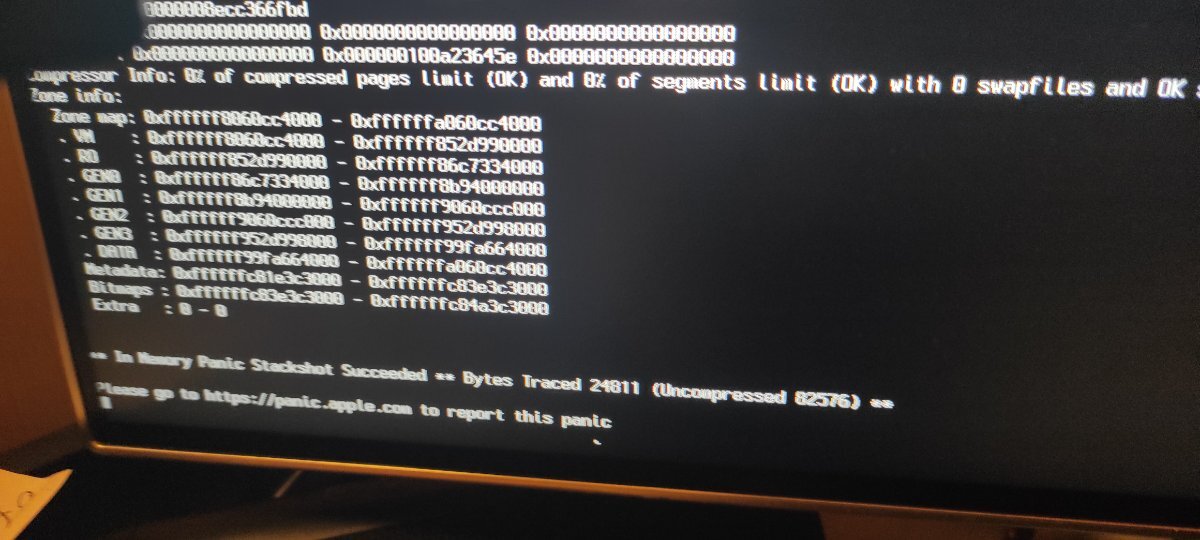
Quando fa i riavvi per l'installazione...va in panico mi tocca spegnere a mano e riaccendere.....poi dopo diverse volte installa....poi una volta installato ci metto la EFI della penna USB nel disco.....per spegnere sempre da tasto pc e non si riavvia più...mi tocca riinserire la penna usb...comunque mi vede la wifi...già è tanto.
-
io sto litigando con l'i5 13500...l'ultimo sto installando tahoe....mi fa imbestialire come una jena, quando fa i riavvi per l'installazione...va in panico mi tocca spegnere a mano e riaccendere.....poi dopo diverse volte installa....poi una volta installato ci metto la EFI della penna USB nel disco.....per spegnere sempre da taso pc e non si riavvia più...mi tpcca riinserire la penna usb...comuqnue mi vede la wifi...già è tanto
-
Aggiornamento... ho collegato l'nvme, ho aggiunto per sicurezza nvmefix.kext, aggiornato il config.plist. con il nuovo kext, il boot parte ma si freeza a "tempo rimanente 28 minuti"... EFI.zip
-
@dany niente di strano è il solo sistema operativo che rallenta, anche se sono convinto che ci sia qualche cosa da inserire o spuntare sul config, oppure qualche kext più aggiornato, perchè una volta superato questo ostacolo gira tranquillo aspettiamo qualcun altro che possa aver avuto lo stesso problema magari mi da una dritta
-
Perdu...meno male che non sono il solo ad avere qualche problemino...😂...comuqnue vedo che hai una scheda video da 4gb...dico la mia cavolata del giorno, non sarà che è troppo piccola, di ram intendo, per caricare il sistema tahoe e piano piano rallenta...non lo so..sicuramente ho detto una cavolata. io ho notato che con il mio pc più piccolo sequoia e sonoma lo sgrulla seza problemi...tahoe è un pochino più lento.
-
sto riscontrando un problema con la mia scheda video in oggetto alla apertura finale di Tahoe tarda un pochino ad arrivare alla schermata principale in ordine mi appare prima il dock, con sfondo grigio del monitor poi iniziano ad apparire le icone nel monitor ed alla fine con calma appare la barra del menu premetto ho installato il tutto su SSD da 1TB e importato tutto dal disco in cui lo avevo installato precedentemente Grazie a prescindere
-
Le cose belle capitano a chi crede. Cose ancora più belle capitano a chi è paziente. Ma le cose migliori vanno a chi non si arrende! 🌟 ℬ𝓊ℴ𝓃 𝟤𝟢𝟤𝟨 🌟
- 1 reply
-
- 1
-

-
Dopo il mio tentativo naufragato con Ventura, sono riuscito a mettere Monterey sulla mia vecchia GA-Z77 ma mi manca wifi e bt. wifi ho una AR9285 bt dovrebbe essere BMC 4350C2 ho trovato questa guida, ma tra il fatto che non ho capito bene cosa fare, ora il wifi è visto nelle proprieta , ma non funziona. https://www.insanelymac.com/forum/topic/359007-wifi-atheros-monterey-ventura-sonoma-sequoia-work/#comment-2818331 per ora ho inserito i 2 kext e dichiarati sul config qualcuno potrebbe spiegarmi meglio come è la procedura? grazie mille!!! AR9285.10.11.v21 Sequoia AirPortAtheros40.zip
- Yesterday
-
👍
-
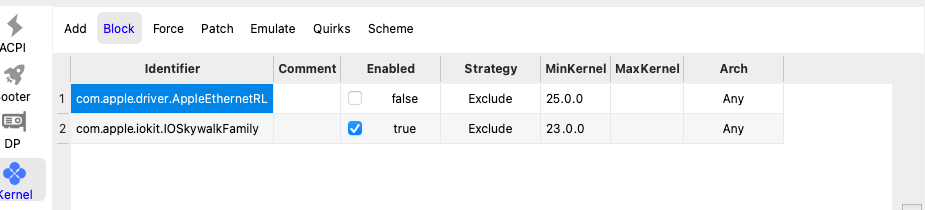
No ma perché, potevi partire da Catalina per arrivare poi a Tahoe 🤣 Non hai la RTL su quella macchina o sbaglio ? Quindi non serve ... se " ributta " 😆 la metti
-
ho un piccolo dubbio...sul Block RTL....se mi vede già il wifi senza blocco mi sa che lo lascio come da foto...cioè non bloccato, in quanto questo pc dovrebbe essere come l'i 5 12400...dove non avevo messo nessun blocco e è stato patchato subito (scusami per il mio linguaggio poco tecnico)
-
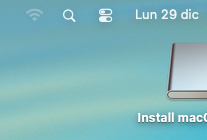
lo vedeeeeeeee il wifi.....se un grandeeeee ANTO😘.....l'ho installato direttamente con Tahoe senza provare a installare Sonoma. ora lo devo patchare con oclp ma se lo vede....non credo ci siano problemi.....GRANDEEEEEEE ANTOOOO
-
-
non sono solo che perdo colpi😅
-
Salve